Introduction à l’investigation numérique (4) -Etat de l’art des outils d’investigation numérique

Ainsi que mentionne dans le chapitre introductif, le processus d’investigation numérique peut être décomposé en trois catégories d’activités: l’acquisition, l’analyse et la présentation. La présentation de l’état de l’art des outils d’investigation numérique sera organisée autour des  ces trois catégories, en distinguant entre  l’état de l’art des outils d’acquisition des données et l’état de l’art des outils d’analyse et de présentation des données.

Les outils d’acquisition des données permettent d’examiner et ensuite de stocker les données dans des containers de données conçus spécialement pour l’investigation numérique. Un paragraphe sera réservé à la présentation de ces containers des données.

Les containers des données

En général, les containers de données présentes certaines fonctionnalités supplémentaires par rapport à une image brute (RAW).  Ces fonctionnalités supplémentaires peuvent concerner la vérification de la cohérence interne, la compression, le cryptage.

En revanche, le format d’image RAW est essentiellement une copie bit à bit des données brutes d’un disque et ne permet pas en général de stocker des métadonnées. Cependant, il arrive que certains outils stockent les métadonnées dans des fichiers secondaires. Le format RAW a été à l’origine utilisé par l’outil Unix dd, mais il est pris en charge par la plupart des applications faisant de l’investigation numérique.

Les formats ouverts

AFF (Advanced Forensic Format)

AFF [AFF] est un format de fichier ouvert et extensible pour stocker des images de disques et des métadonnées associées. En utilisant AFF, l’utilisateur n’est pas dépendent d’un format propriétaire qui peut limiter la façon dont il ou elle peut mener son travail.

Un standard ouvert permet aux enquêteurs d’utiliser rapidement et efficacement leurs outils préférés pour recueillir des renseignements ou résoudre les incidents de sécurité.

AFF offre un design extensible et flexible :

  • Design extensible. AFF prend en charge la définition des métadonnées arbitraires en stockant toutes les données sous forme de noms et de paires de valeurs, appelés segments. Certains segments stockent des données du disque et d’autres stockent des métadonnées. En raison de cette conception générale, toutes les métadonnées peuvent être définies en créant simplement un nouveau nom et une paire de valeurs. Chacun des segments peut être comprimé afin de réduire la taille des images et des valeurs de hachages cryptographiques peuvent être calculées pour chaque segment pour assurer l’intégrité des données.
  • Design flexible. Pour plus de flexibilité, il existe trois variantes de fichiers AFF – AFF, AFD et AFM et des outils librement disponibles pour convertir facilement les fichiers d’un format a l’autre. Le format original AFF est représenté par un seul fichier, contenant des segments avec les données du disque et des métadonnées. Son contenu peut être compressé, mais il peut être assez grand puisque les données des disques durs modernes atteignent souvent 100 Go en taille. Pour faciliter le transfert, les fichiers AFF peuvent être divisés en plusieurs fichiers au format AFD. Les fichiers AFD (qui ont une taille plus reduite) peuvent être facilement manipulés sur des supports qui limitent la taille de fichiers à 2 Go, tel que par exemple le système de fichiers FAT ou DVD. Le format AFM stocke les métadonnées dans un fichier AFF et les données du disque dans un fichier séparé brut (RAW file). Ce format permet à des outils d’analyse qui prennent en charge le format RAW d’accéder aux données, mais sans perdre les métadonnées.

AFF prend en charge deux algorithmes de compression : zlib, qui est rapide et raisonnablement efficace et LZMA, qui est plus lent, mais beaucoup plus efficace. Zlib est en effet le même algorithme de compression utilisé par EnCase. En conséquence, les fichiers AFF compressés avec zlib ont à peu près la même taille que les fichiers EnCase équivalents. Les fichiers AFF peuvent être re-comprimés en utilisant l’algorithme LZMA.

AFF2.0 supporte le chiffrement des images disque. Les images cryptées ne peuvent pas être accessibles sans la clé de déchiffrement nécessaire.

AFF4

AFF4 est une refonte complète du format AFF. AFF4 est orientée vers des corpus des images très grandes. AFF4 a une architecture orientée objet, tous les objets étant adressables par leur nom qui est unique. AFF4 définit un volume comme un mécanisme de stockage qui peut stocker un segment (bits de données binaires) par son nom et le récupérer aussi par le nom. Actuellement AFF4 a deux implémentations de volume: un répertoire et un fichier Zip.

L’implémentation du volume AFF4 sur un répertoire permet de stocker les segments sous forme de fichiers plats à l’intérieur d’un répertoire régulier sur le système de fichiers. Ceci est vraiment utile si l’on veut faire une image d’un système de fichiers FAT. Il est aussi possible de monter le répertoire sur une url http (par exemple, le répertoire commence avec http://somehost/url/). Cela permet d’utiliser l’image directement depuis le web – pas besoin de télécharger le volume entier.

L ‘implémentation du volume AFF4 sur un fichier Zip stocke les segments à l’intérieur d’une archive zip. Si l’archive est trop grand (plus de 4 Go), l’extension Zip64 est utilisée.

Gfzip (Generic Forensic Zip)

Gfzip [GFZIP] vise à fournir un format de fichier ouvert « compressé » et « signé » pour des fichiers d’image disque. Gfzip utilise l’algorithme SHA256 pour vérifier l’intégrité de données au lieu de SHA1 ou MD5. Les métadonnées fournies par l’utilisateur sont incorporées dans une section spéciale dans le fichier. Une autre fonctionnalité importante de gfzip est l’utilisation de données et métadonnées signées avec des certificats x509.

Sgzip

Introduit par le produit PyFlag (un outil pour faire de l’analyse numérique) et démarré comme un projet dans le département de la défense australien, sgzip est une variante du format gzip sur lequel on peut faire des recherches. En comprimant individuellement les blocs de données, sgzip permet de faire des recherches par mots-clés sur des images sans décompresser l’image entièrement.

Les formats propriétaires

EnCase

EnCase [ENCASE] est peut-être le standard de facto pour les containers de données utilisés dans l’investigation numérique, même si c’est un format propriétaire et complètement fermé. Ce format est largement basé sur le format ASR Data’s Expert Witness Compression Format.

Non seulement le format est compressible, il est également consultable. La compression est effectuée au niveau des blocks et permet de générer et de conserver des pointers vers des fichiers, pour améliorer la vitesse de la consultation. Les images EnCase peuvent être divisées en plusieurs fichiers (par exemple, pour l’archivage sur CD ou DVD). Le format restreint le type et la quantité des métadonnées qui peuvent être associés à une image.

Les formats IDIF, IRBF, IEIF de ILook

La société ILook [ILOOK] offre trois formats d’image propriétaires : un format comprimé (IDIF), un format non-compressé (IRBF) et un format crypté (IEIF). Bien que peu de détails techniques soient divulgués publiquement, la documentation en ligne fournit quelques indications: IDIF a un support pour «la journalisation des actions de l’utilisateur”. IRBF est semblable à IDIF, sauf que les images de disque ne sont pas compressées; IEIF, quant à lui, chiffre lesdites images. Les outils d’ILook permet la transformation de chacun de ces formats en format brut (RAW files).

Il y d’autres formats propriétaires moins connues comme ProDiscover, RAID (Rapid Action Imaging Device), SMART. Le tableau suivant récapitule les principales caractéristiques des  différents formats des containers des données.

  Extensible (supporte le stockage demétadonnéesarbitraire) Non-Propriétaire Compressé & recherchable
AFF X X X
EnCase X
ILook ? X
Gfzip X
Sgzip X X
SMART X
ProDiscover X X

Les principales caractéristiques des  différents formats de fichiers

Les outils d’acquisition des données

Dans la création d’une image numérique d’un disque d’un système d’information, on essaye de capturer une représentation  aussi exacte que possible du média source. Un bon procédé de copie d’image, génère un duplicate exacte du média source en cours d’investigation. Par duplicate exacte on comprend une copie octet par octet du support original. Le processus de création d’une image numérique ne devrait pas modifier le support d’origine, il devrait parvenir à acquérir entièrement les données du média d’origine et ne pas introduire dans l’image crée des données qui ne sont pas présents sur le média source.

Travailler avec des preuves numériques d’origine peut être très dangereux parce que l’original peut être modifié ou détruit avec une relative facilité. En accédant les medias d’origine seulement une fois, pour générer la copie numérique, nous minimisons les possibilités de modifier l’original accidentellement. Un autre avantage de travailler sur une copie est qu’en cas de modification par erreur de la copie d’image, on peut générer un duplicata exact du support d’origine.

Une autre raison d’utiliser des outils d’acquisition des données est leur capacité a fournir des informations exhaustives. L’examen d’un système de fichiers tel que présenté par le système d’exploitation n’est pas suffisant pour un processus d’investigation numérique. La plupart des volumes contiennent des données potentiellement intéressantes qui ne sont pas visibles ; on peut appeler ces données, des “données supprimées”. Il y en a plusieurs catégories de “données supprimées” :

  • Les fichiers supprimés sont “les plus récupérables.” En général, cela se réfère à des fichiers qui ont été effacés de façon logique du disque; le fichier n’est plus présent lorsque l’utilisateur consulte un répertoire ; le nom du fichier, la structure des métadonnées et les données du fichier sont marqués comme «libres». Cependant, les connexions entre le nom du ficher, les métadonnées respectives et le contenu du fichier sont encore intactes et la récupération du fichier consiste à enregistrer le nom du fichier et des structures pertinentes de métadonnées, puis d’extraire son contenu.
  • Les fichiers orphelins sont similaires à des fichiers supprimés à l’exception du lien entre le nom du fichier et les métadonnées qui n’est plus exact. Dans ce cas, la récupération de données et des métadonnées est encore possible, mais il n’y a pas de corrélation directe entre le nom du fichier et les données récupérées.
  • Les fichiers non affectés sont les fichiers qui ont été supprimés et leurs noms et ou métadonnées ont été réutilisés par d ‘autres fichiers. Dans ce cas, le seul moyen de récupérer les informations est par l’utilisation du « data carving ». Seules les informations qui n’ont pas été allouées a d’autres fichiers pourront etre recuperees.
  • Les fichiers réécrits ce sont les fichiers dont une ou plusieurs de leurs unités de données ont ete réaffectées à un autre fichier. Le rétablissement complet n’est plus possible, mais la reprise partielle peut dépendre de la mesure de l’écrasement.

Matériels

DeepSpar Disk Imager

DiskImager [DEEPSPAR]  est une solution matérielle pour faire une copie bit a bit du contenu d’un disque. Les disques source et cible sont connectés a un boitier qui lui même est connecté à un ordinateur. Le boitier est capable de commander le disque source en exécutant des commandes au niveau de l’interface SATA sans passer par des appels BIOS, ce qui facilite la récupération des zones de disque corrompues.

Contrairement aux outils d’investigation numérique, le DiskImager ne crée pas une image du disque source. Au lieu de cela, il utilise des commandes et des techniques pour copier tous les secteurs du disque source directement sur le disque de destination. Le disque de destination peut ensuite être utilisé par n’importe quel logiciel de récupération de données ou d’investigation numérique pour la récupération des données.

D’autres sociétés offrent des produits similaires au DiskImager : PSIClone (http://www.thepsiclone.com/), ICS Solo 3 (http://www.icsforensic.com/)

Logiciels

Volatility

Volatility [VOLATILITY] est une collection d’outils complètement ouverts, développés en Python sous licence GPL, pour l’extraction des données de la mémoire volatile (RAM). L’extraction de données est réalisée complètement indépendemment du système d’exploitation utilisé, mais offre la possibilité d’avoir un aperçu de l’état d’exécution du système.

Volatility fournit actuellement des capacités d’extraction des données concernant les processus en cours, les sockets réseaux ouverts, les connections réseaux ouverts, les fichiers ouverts pour chaque processus, la mémoire adressée par processus, les modules du noyau chargés.

dd (Data Dump)

La commande dd[DD] est l’outil open-source fondamental necessaire pour créer une image d’un disque. Compte tenu du fait qu’il est presque universellement présent sur n’importe quel système d’exploitation Unix, il est la base de plusieurs autres utilitaires d’acquisition des données et l’apprentissage de son fonctionnement est important à n’importe quel examinateur.

L’utilisateur peut fournir des arguments divers et des drapeaux pour modifier ce comportement simple, mais la syntaxe de base de l’outil est assez claire.

Donc, pour faire un simple clone d’un disque à l’autre, il faut utiliser l’outil de la façon suivante:

dd if=/dev/sda of=/dev/sdb bs=4096

La commande lit par tranches de 4096 octets du disque /dev/sda vers le deuxième disque (/dev/sdb).

Le clonage d’un disque est intéressant, mais d’une utilité limitée pour un examinateur. Dans la plupart des cas, nous nous intéressons à la création d’une image numérique d’un fichier qui contient l’ensemble du contenu présent sur le disque source. Cette operation est egalement tres simple à effectuer en utilisant la même syntaxe.

$ dd if=/dev/sdg of=dd.img bs=32K
60832+0 records in60832+0 records out

1993342976 bytes (2.0 GB) copied, 873.939 s, 2.3 MB/s

Les éléments clés d’intérêt dans la sortie de la console pour la commande dd sont les lignes « records in » et « records out ». A ce titre, on peut observer tout d’abord que le nombre d’enregistrements lus et écrits est le même – cela indique qu’il n’y a pas de perte des données en raison d’une défaillance du disque, de l’échec d’écriture du fichier de sortie ou bien, pour toute autre raison.

dcfldd

Le projet dcfldd[DCFLDD] est un projet dérivé du projet dd, donc ses fonctionnalités sont similaires au dd. Toutefois, dcfldd a des capacités intéressantes qui ne se retrouvent pas dans dd. La plupart des fonctionnalités tournent autour de la création des valeurs de hachage, la validation, la journalisation de l’activité et la division du fichier de sortie en plusieurs fichiers de taille fixe. Les fonctions étendues de dcfldd, ainsi que les fonctions de dd peuvent être examinées en passant l’option –help pour la commande dcfldd.

dc3dd

dc3dd[DC3DD] est conçu comme un patch appliqué à GNU dd, plutôt qu’une variante de dd, de sorte que dc3dd est capable d’intégrer les modifications apportées sur dd plus rapidement que dcfldd.

dc3dd produit un journal de hachage à la console ainsi que dans un fichier passé dans l’argument hashlog. En outre, a la fin d’une opération, l’outil présente le nombre de secteurs écrits/lus plutôt que le nombre de blocs.

ewfacquire, ewfacquirestream

Les outils ewfacquire et ewfacquirestream font partie de la bibliothèque libewf [LIBEWF]. Ils peuvent créer des fichiers dans le format EnCase, FTK Imager et SMART. ewfacquire est destiné à lire à partir de périphériques et ewfacquirestream à partir des tuyaux (pipes). Ces deux outils peuvent calculer des valeurs de hachage MD5 quand les données sont en cours d’acquisition.

NED (The Open Source Network Evidence Duplicator)

NED [NED] est un outil d’acquisition et duplication de données plutôt unique dans son genre, puisqu’il utilise un modèle client-serveur. Le serveur stocke les données envoyées pas le client, le serveur et le client en communiquant par le protocole UDP. NED a une architecture ouverte qui accepte des plugins. Les plugins sont des modules qui se branchent dans NED et entendent les fonctionnalités pendant le processus d’acquisition. NED contient déjà les plugins suivants :

  • « Image Store Plugin« (crée une image dd du disc client), «Hash« (calcule les empreintes des fichiers acquis)
  • « String Search« (la recherche par mots clés)
  • « Carv« (pour la recherche des fichiers effacées)
  • « Compress Image Store« (comprimer les images acquises)

Malgré des débuts prometteurs, le projet NED est actuellement disparu, la dernière version téléchargeable datant de 2004.         

FTK Imager

Le Forensic Toolkit Imager [FTKI] est une suite d’outils d’acquisition des données commercialisées par la société AccessData. FTK Imager est capable de stocker les images de disques le format ECase, SMART, dans le format brut (raw) mais aussi dans le format ISO/CUE.

D’autres outils sont disponibles sur la plateforme Unix/Linux ; Voici une liste non-exhaustive :

Windows Unix/Linux
Adepto http://www.e-fense.com/helix/ X
AIR http://air-imager.sourceforge.net/ X
EnCase LinEn http://www.digitalintelligence.com X
GNU ddrescue http://www.gnu.org/software/ddrescue X
dd_rescue http://www.garloff.de/kurt/linux/ddrescue/ X
MacQuisition Boot CD https://www.blackbagtech.com X
rdd http://sourceforge.net/projects/rdd X
GuyManager http://guymager.sourceforge.net/ X
ASR Data Acquisition & Analysis, http://www.asrdata.com/ X
Paraben Forensics http://www.paraben-forensics.com/ X
XWay Forensics http://www.x-ways.net/forensics/ X
Forensic Imager http://www.forensicimager.com/ X
Forensic Acquisition Utilities X
FTTimes http://ftimes.sourceforge.net/FTimes/index.shtml X X

D’autres outils d’acquisition des données

Les outils d’analyse des données

Le but des outils d’analyse des données est d’identifier, extraire et analyser les artefacts générés par les outils d’acquisition de données. L’identification consiste à déterminer les fichiers actifs ou supprimés, qui sont présents dans un container de données. L’extraction consiste dans la récupération des fichiers et des métadonnées pertinents. L’analyse est le processus d’examen de l’ensemble des données, qui idéalement conduit à des résultats probants.

Gratuit

The Sleuth KIT

TSK [TSK] est une collection d’outils UNIX en ligne de commande permettant de faire de l’investigation numérique. La collection contient une vingtaine d’outils et la majeure partie des outils sont nommés de façon logique, en indiquant la couche du système de fichiers sur laquelle ils opèrent et le type de résultat obtenu.

Les préfixes des noms des outils TSK sont:

  • « mm-» pour les outils qui travaillent sur des volumes (media management)
  • « fs- » pour les outils qui travaillent sur la structure du système de fichiers
  • « blk-» pour les outils qui travaillent sur les blocs des données.
  • « i-» pour les outils qui travaillent sur les métadonnées (inodes)
  • « f-» pour les outils qui travaillent sur les noms des fichiers
  • « j-» pour les outils qui travaillent sur le système de journalisation de système de fichiers.
  • « img-» pour les outils qui travaillent sur les images des systèmes de fichiers.

Les suffixes communs trouvés dans les outils TSK qui indiquent la fonction attendue du l’outil
sont les suivants:

  • «-stat »  affiche des informations générales sur l’élément interrogé ; similaire à la commande “stat” sur les systèmes Unix.
  • « -ls » affiche le contenu de l’élément interrogé ; similaire à la commande “ls” sur les systèmes Unix.
  • « -cat » extrait le contenu de l’élément interrogé ; similaire à la commande “cat” sur les systèmes Unix.

Autopsy

Autopsy[AUTOPSY] est une interface graphique web pour le The Sleuth Kit.

Scalpel

Scalpel [SCALPEL]  est un utilitaire pour faire du carving qui lit une base de données des définitions d’entêtes et des pieds de page (footers) et extrait des fichiers correspondants ou des fragments des fichiers a partir des images des disques ou des fichiers raw. Scalpel est Independent du système des fichiers et est capable de travailler sur des partitions FATx, NTFS, ext2/3, HFS+.

PyFLAG

PyFLAG [PYFLAG] est un outil d’analyse basé sur le langage Python. PyFLAG est une application web, donc un utilisateur n’a besoin que d’un simple navigateur Web pour effectuer un examen.

Étant une application web utilisant une base de données,  donne à PyFLAG plusieurs avantages par rapport aux outils traditionnels d’investigation numérique, qui tendent à être utilisés par un seul utilisateur sur un seul système. Une instance PyFLAG peut supporter  plusieurs utilisateurs sur un seul cas ou plusieurs utilisateurs travaillant sur des cas différents en parallèle. En plus du modèle de serveur, PyFLAG a quelques autres fonctionnalités qui en font un outil intéressant pour un examinateur en utilisant des outils open source.

PyFLAG dispose d’un système de fichiers unifié virtuel (VFS) pour tous les objets en cours d’examen. PyFLAG se réfère à chacun de ces éléments des inodes. Chaque élément chargé dans la base de données du PyFLAG reçoit un inode PyFLAG, en plus des métadonnées des l’élément. Cela signifie qu’on peut charger sous la même racine virtuelle des images de système de fichiers (quelque soit leur nombre), des captures du trafic réseau, des fichiers de journalisation et même des flux de données non structurées, ces informations pouvant être traitées par la suite traitées avec PyFLAG.

Fiwalk

Fiwalk[FIWALK] est une bibliothèque et une suite de programmes connexes visant à automatiser une grande partie de l’analyse du système de fichiers initial effectué lors d’une investigation numérique. Le nom vient de “file & inode walk», qui décrit les fonctions du programme. La sortie de Fiwalk est une cartographie des systèmes de fichiers d’un disque et les fichiers contenus, y compris les métadonnées de fichiers intégrés. L’objectif du projet Fiwalk est de fournir un langage de description XML normalisé pour le contenu d’un fichier contenant des données forensiques  et de permettre un traitement plus rapide des données provenant d’une investigation numérique.

Parce que Fiwalk hérite les capacités d’analyse des systèmes de fichiers de TSK, il est capable de supporter n’importe quelle partition, volume ou structure du système de fichiers que TSK est capable de lire. En plus de sa sortie standard XML, Fiwalk peut fournir une sortie dans un format texte, un format TSK ou un format CSV.

Hachoir

Hachoir [HACHOIR] est un framework générique pour la manipulation de fichiers binaires. Ecrit en Python, il est indépendant du système d’exploitation et il peut accepter beaucoup d’interfaces graphiques utilisateur (ncurses, wxWidget, Gtk +). Bien qu’il contienne quelques fonctions de modification de fichiers, il est normalement prévu pour examiner des fichiers existants en étant capable actuellement de gérer plus d’une soixante des formats de fichiers. La reconnaissance du format de fichier est basée sur les en-têtes et il dispose aussi d’un analyseur tolérant aux défauts, conçu pour gérer les fichiers tronqués ou incomplets.

Hachoir permet de “naviguer” sur tout flux binaire, de la même manière qu’on peut naviguer sur des répertoires et des fichiers. Un fichier est divisé en un arbre de champs, où le plus petit champ est un bit. Il existe d’autres types de champs: des entiers, des chaînes de bits, etc.

Hachoir est composé d’un parseur principal (hachoir-core), des divers parseurs pour différents formats de fichier (hachoir-parser) et d’autres programmes périphériques.

Commercial

Forensics Toolkit

Forensic Toolkit [FTKI] est un outil qui permet de faire une analyse numérique complète. Pour la création des images de disques, FTK contiens le FTK Imager. Pour stocker les informations, FTK utilise une base de données, qui rend le produit accessible par plusieurs utilisateurs en mode concurrent.  Le FTK Case Manager permet le stockage des preuves numériques mais aussi l’indexation des preuves.

XIRAF

Xiraf [XIRAF] est un outil d’analyse de données. Xiraf indexe et rend consultable les preuves numériques par l’extraction et l’organisation de l’information qui a de la valeur pour les enquêteurs. Xiraf est capable d’indexer des fichiers de métadonnées, des enregistrements d’historique du navigateur, des clés des registres, des propriétés des documents, emails, etc. Une fois que la preuve a été indexée, les enquêteurs recherchent les éléments de preuve à travers l’interface web de XIRAF. Avec cette interface, les enquêteurs peuvent combiner des recherches utilisant des multiples dimensions comme le temps, l’emplacement et le contenu.

Un premier prototype du système a été présenté à DFRWS 2006 dans un document intitulé “XIRAF – XML-based indexing and querying for digital forensics“.
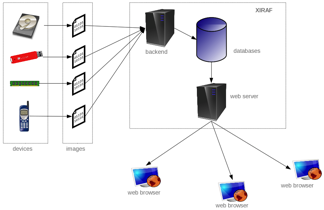
L'architecture de Xiraf
L’architecture de Xiraf

Les défis futurs de l’investigation numérique

L’investigation numérique en est encore à ses balbutiements compte tenu de son existence relativement courte, ainsi que du rythme rapide du changement technologique. Cette situation se traduit par de nombreux défis et controverses avec lesquels les communautés juridiques et judiciaires doivent se débattre. Les défis sont nombreux. Un premier défi est lié à la vitesse de changement des technologies informatiques. Un autre défi est de trouver un consensus au sein de la communauté scientifique pour trouver et établir les bonnes pratiques d’un processus d’investigation numérique.

L’investigation numérique est à l’origine d’une collision entre deux forces apparemment irréductibles: le système juridique d’une coté qui fonctionne à un rythme relativement lent et de l’autre coté la communauté de l’investigation numérique qui est en contact avec la technologie  qui avance et évolue a la vitesse de l’éclair.

Du point de vue technologique, l’investigation numérique est confrontée a deux nouvelles technologies qui soulèvent des sérieux défis: l’informatique dans les nouages (cloud computing) et les disques SSD (Solid State Drive). Dans l’état actuel, l’investigation numérique dans un de ces environnements pourrait très bien être irrécupérable pour des raisons soit techniques ou juridiques (ou les deux). Ces technologies sont en usage aujourd’hui et représentent un problème pour lequel il n’existe pas de solution facile.

L’informatique dans les nuages peut être un rêve devenu réalité pour ceux qui travaillent dans l’industrie de l’information, mais cela représente un cauchemar pour ceux qui traitent avec des preuves numériques. Les principaux défis sont de deux ordres, l’un technique et l’autre juridique. Le défi technique est lié a l’impossibilité d’accéder à distance au contenu effacé puisque il y a des fortes chances que le disque qui contenait cette information ait été déjà réutilisé pour stocker un autre contenu. Le défi juridique est lié aux juridictions multiples qui peuvent s’appliquer aux données, aux applications et/ou aux fournisseur de services dans les nouages.

Les mémoires SSD posent un défi technique lié à l’effacement des fichiers. L’écriture d’une cellule d’une mémoire SSD doit passer d’abord par le reset du contenu de la cellule, ce qui diminue fortement les performances en écriture du disc. Pour combler ce manque de performance, les cellules sont resetées lors de l’effacement des fichiers soit par le système de l’exploitation  via la commande TRIM, soit directement par le contrôleur du SSD. Donc, lors de l’effacement d’un fichier, le contenu du fichier est complètement perdu, ce qui pose des problèmes lors des investigations numériques.
(My) CISSP Notes – Access control

Note: This notes were made using the following books: “CISPP Study Guide” and “CISSP for dummies”.

The purpose of access control is to allow authorized users access to appropriate data and deny access to unauthorized users and the mission and purpose of access control is to protect the confidentiality, integrity, and availability of data. Access control is performed by implementing strong technical, physical and administrative measures. Access control protect against threats such as unauthorized access, inappropriate modification of data, loss of confidentiality.

Basic concepts of access control

CIA triad and his opposite (DAD) – see (My) CISSP Notes – Information Security Governance and Risk Management

A subject is an active entity on a data system. Most examples of subjects involve people accessing data files. However, running computer programs are subjects as well. A Dynamic Link Library file or a Perl script that updates database files with new information is also a subject.

An object is any passive data within the system. Objects can range from databases to text files. The important thing remember about objects is that they are passive within the system. They do not manipulate other objects.

Access control systems provide three essential services:

  • Authentication – determines whether a subject can log in.
  • Authorization – determines what an subject can do.
  • Accountability – describes the ability to determine which actions each user performed on a system.

Access control models

Discretionary Access Control (DAC)

Discretionary Access Control (DAC) gives subjects full control of objects they have been given access to, including sharing the objects with other subjects. Subjects are empowered and control their data.

Standard UNIX and Windows operating systems use DAC for filesystems.

  • Access control list (ACLs) provides a flexible method for applying discretionary access controls. An ACL lists the specific rights and permissions that are assigned to a subject fora given object.
  • Role-Based Access Control (RBAC) is another method for implementing discretionary access controls. RBAC defines how information is accessed on a system based on the role of the subject. A role could be a nurse, a backup administrator, a help desk technician, etc. Subjects are grouped into roles and each defined role has access permissions based upon the role, not the individual.

Major disadvantages of DAC include:

  • lack of centralized administration.
  • dependence of security-conscious resource owners.
  • difficult auditing because of the large volume of log entries that can be generated.

Mandatory Access Control (MAC)

Mandatory Access Control (MAC) is system-enforced access control based on subject’s clearance and object’s labels. Subjects and Objects have clearances and labels, respectively, such as confidential, secret, and top secret.

A subject may access an object only if the subject’s clearance is equal to or greater than the object’s label. Subjects cannot share objects with other subjects who lack the proper clearance, or “write down” objects to a lower classification level (such as from top secret to secret). MAC systems are usually focused on preserving the confidentiality of data.

In MAC, the system determines the access policy.

Common MACs models includes Bell-La Padula, Biba, Clark-Wilson; for more infos about these models please see : (My) CISSP Notes – Security Architecture and Design .

Major disadvantages of MAC control techniques include:

  • lack of flexibility.
  • difficulty in implementing and programming.

Access control administration

An organization must choose the type of access control model : DAC or MAC. After choosing a model, the organization must select and implement different access control technologies and techniques. What is left to work out is how the organization will administer the access control model. Access control administration comes in two basic flavors: centralized and decentralized.

Centralized access models systems maintains user account information in a central location. Centralized access control systems allow organizations to implement a more consistent, comprehensive security policy, but they may not be practical in large organizations.

Exemples  of centralized access control systems and protocols commonly used for authentication of remote users:

  • LDAP
  • RAS – Remote Access Service servers utilize the Point-to-Point Protocol (PPP) to encapsulate IP packets. PPP incorporates the following three authentication protocols: PAP (Password Authentication Protocol), CHAP (Challenge Handshake Authentication Protocol), EAP (Extensible Authentication Protocol).
  • RADIUS – The Remote Authentication Dial In User Service protocol is a third-party authentication system. RADIUS is described in RFCs 2865 and 2866, and uses the User Datagram Protocol (UDP) ports 1812 (authentication) and 1813 (accounting).
  • Diameter is RADIUS’ successor, designed to provide an improved Authentication, Authorization, and Accounting (AAA) framework. RADIUS provides limited accountability, and has problems with flexibility, scalability, reliability, and security. Diameter also uses Attribute Value Pairs, but supports many more: while RADIUS uses 8 bits for the AVP field (allowing 256 total possible AVPs), Diameter uses 32 bits for the AVP field (allowing billions of potential AVPs). This makes Diameter more flexible, allowing support for mobile remote users, for example.
  • TACACS -The Terminal Access Controller Access Control System is a centralized access control system that requires users to send an ID and static (reusable) password for authentication. TACACS uses UDP port 49 (and may also use TCP).

Decentralized access control allows IT administration to occur closer to the mission and operations of the organization. In decentralized access control, an organization spans multiple locations, and the local sites support and maintain independent systems, access control databases, and data. Decentralized access control is also called distributed access control.

Access control defensive categories and types

Access control is achieved throughout an entire et of control which , identified by purpose, include;

  • preventive controls, for reducing risks.
  • detective controls, for identifying violations and incidents.
  • corrective controls, for remedying violations and incidents.
  • deterrent controls, for discouraging violations.
  • recovery controls, for restoring systems and informations.
  • compensating controls, for providing alternative ways of achieving a task.

These access control types can fall into one of three categories: administrative, technical, or physical.

  1. Administrative (also called directive) controls are implemented by creating and following organizational policy, procedure, or regulation.
  2. Technical controls are implemented using software, hardware, or firmware that restricts logical access on an information technology system.
  3. Physical controls are implemented with physical devices, such as locks, fences, gates, security guards, etc.

Preventive controls prevents actions from occurring.

Detective controls are controls that alert during or after a successful attack.

Corrective controls work by “correcting” a damaged system or process. The corrective access control typically works hand in hand with detective access controls.

After a security incident has occurred, recovery controls may need to be taken in order to restore functionality of the system and organization.

The connection between corrective and recovery controls is important to understand. For example, let us say a user downloads a Trojan horse. A corrective control may be the antivirus software “quarantine.” If the quarantine does not correct the problem, then a recovery control may be implemented to reload software and rebuild the compromised system.

Deterrent controls deter users from performing actions on a system. Examples include a “beware of dog” sign:

A compensating control is an additional security control put in place to compensate for weaknesses in other controls.

Here are more clear-cut examples:

Preventive

  • Physical: Lock, mantrap.
  • Technical: Firewall.
  • Administrative: Pre-employment drug screening.

Detective

  • Physical: CCTV, light (used to see an intruder).
  • Technical: IDS.
  • Administrative: Post-employment random drug tests.

Deterrent

  • Physical: “Beware of dog” sign, light (deterring a physical attack).
  • Administrative: Sanction policy.

Authentication methods

A key concept for implementing any type of access control is controlling the proper authentication of subjects within the IT system.

There are three basic authentication methods:

  • something you know – requires testing the subject with some sort of challenge and response where the subject must respond with a knowledgeable answer.
  • something you have – requires that users posses something, such as a token, which proves they are an authenticated user.
  • something you are – is biometrics, which uses physical characteristics as a means of identification or authentication.
  • A fourth type of authentication is some place you are – describes location-based access control using technologies such as the GPS, IP address-based geo location. these controls can deny access if the subject is in incorrect location.

Biometric Enrollment and Throughput

Enrollment describes the process of registering with a biometric system: creating an account for the first time.

Throughput describes the process of authenticating to a biometric system.

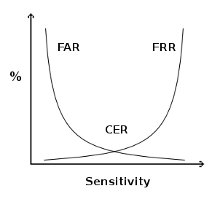
Three metrics are used to judge biometric accuracy:

  • the False Reject Rate (FRR) or Type I error- a false rejection occurs when an authorized subject is rejected by the biometric system as unauthorized.
  • the False Accept Rate (FAR) or Type II error- a false acceptance occurs when an unauthorized subject is accepted as valid.
  • the Crossover Error Rate (CER) –  describes the point where the False Reject Rate (FRR) and False Accept Rate (FAR) are equal. CER is also known as the Equal Error Rate (EER). The Crossover Error Rate describes the overall accuracy of a biometric system.
Use CER to compare FAR and FRR

Types of biometric control

Fingerprints are the most widely used biometric control available today.

A retina scan is a laser scan of the capillaries which feed the retina of the back of the eye.

An iris scan is a passive biometric control. A camera takes a picture of the iris (the colored portion of the eye) and then compares photos within the authentication database.

In hand geometry biometric control, measurements are taken from specific points on the subject’s hand: “The devices use a simple concept of measuring and recording the length, width, thickness, and surface area of an individual’s hand while guided on a plate.”

Keyboard dynamics refers to how hard a person presses each key and the rhythm by which the keys are pressed.

Dynamic signatures measure the process by which someone signs his/her name. This process is similar to keyboard dynamics, except that this method measures the handwriting of the subjects while they sign their name.

A voice print measures the subject’s tone of voice while stating a specific sentence or phrase. This type of access control is vulnerable to replay attacks (replaying a recorded voice), so other access controls must be implemented along with the voice print.

Facial scan technology has greatly improved over the last few years. Facial scanning (also called facial recognition) is the process of passively taking a picture of a subject’s face and comparing that picture to a list stored in a database.

Access control technologies

There are several technologies used for the implementation of access control.

Single Sign-On (SSO) allows multiple systems to use a central authentication server (AS). This allows users to authenticate once, and then access multiple, different systems.

SSO is an important access control and can offer the following benefits:

  • Improved user productivity.
  • Improved developer productivity – SSO provides developers with a common authentication framework.
  • Simplified administration.

The disadvantages of SSO are listed below and must be considered before implementing SSO on a system:

  • Difficult to retrofit.
  • Unattended desktop. For example a malicious user could gain access to user’s resources if the user walks away from his machine and leaves in log in.
  • Single point of attack .

SSO is commonly implemented by third-party ticket-based solutions including Kerberos, SESAME or KryptoKnight.

Kerberos is a third-party authentication service that may be used to support Single Sign-On. Kerberos uses secret key encryption and provides mutual authentication of both clients and servers. It protects against network sniffing and replay attacks.

Kerberos has the following components:

  • Principal: Client (user) or service
  • Realm: A logical Kerberos network
  • Ticket: Data that authenticates a principal’s identity
  • Credentials: a ticket and a service key
  • KDC: Key Distribution Center, which authenticates principals
  • TGS: Ticket Granting Service
  • TGT: Ticket Granting Ticket
  • C/S: Client Server, regarding communications between the two

Kerberos provides mutual authentication of client and server.Kerberos mitigates replay attacks (where attackers sniff Kerberos credentials and replay them on the network) via the use of timestamps.

The primary weakness of Kerberos is that the KDC stores the plaintext keys of all principals (clients and servers). A compromise of the KDC (physical or electronic) can lead to the compromise of every key in the Kerberos realm. The KDC and TGS are also single points of failure.

SESAME is Secure European System for Applications in a Multi-vendor Environment, a single sign-on system that supports heterogeneous environments.

“SESAME adds to Kerberos: heterogeneity, sophisticated access control features, scalability of public key systems, better manageability, audit and delegation.”20 Of those improvements, the addition of public key (asymmetric) encryption is the most compelling. It addresses one of the biggest weaknesses in Kerberos: the plaintext storage of symmetric keys.

Assessing access control

A number of processes exist to assess the effectiveness of access control. Tests with a narrower scope include penetration tests, vulnerability assessments, and security audits.

Penetration tests

Penetration tests may include the following tests:

  • Network (Internet)
  • Network (internal or DMZ)
  • Wardialing
  • Wireless
  • Physical (attempt to gain entrance into a facility or room)

A zero-knowledge (also called black box) test is “blind”; the penetration tester begins with no external or trusted information, and begins the attack with public information only.

A full-knowledge test (also called crystal-box) provides internal information to the penetration tester, including network diagrams, policies and procedures, and sometimes reports from previous penetration testers.

Penetration testers use the following methodology:

  • Planning
  • Reconnaissance
  • Scanning (also called enumeration)
  • Vulnerability assessment
  • Exploitation
  • Reporting

Vulnerability testing

Vulnerability scanning (also called vulnerability testing) scans a network or system for a list of predefined vulnerabilities such as system misconfiguration, outdated software, or a lack of patching. A vulnerability testing tool such as Nessus (http://www.nessus.org) or OpenVAS (http://www.openvas.org) may be used to identify the vulnerabilities.

Security audit

A security audit is a test against a published standard. Organizations may be audited for PCI (Payment Card Industry) compliance, for example. PCI includes many required controls, such as firewalls, specific access control models, and wireless encryption.

Security assessments

Security assessments view many controls across multiple domains, and may include the following:

  • Policies, procedures, and other administrative controls
  • Assessing the real world-effectiveness of administrative controls
  • Change management
  • Architectural review
  • Penetration tests
  • Vulnerability assessments
  • Security audits

(My) CISSP Notes – Business Continuity and Disaster Recovery Planning

Note: This notes were made using the following books: “CISPP Study Guide” and “CISSP for dummies”.

Business Continuity and Disaster Recovery Planning is an organization’s last line of defense: when all other controls have failed, BCP/DRP is the final control that may prevent drastic events such as injury, loss of life, or failure of an organization.

An additional benefit of BCP/DRP is that an organization that forms a business continuity team, and conducts a thorough BCP/DRP process, is forced to view the organization’s critical processes and assets in a different, often clarifying, light. Critical assets must be identified and key business processes understood. Standards are employed. Risk analysis conducted during a BCP/DRP plan can lead to immediate mitigating steps.

BCP

The overarching goal of a BCP is for ensuring that the business will continue to operate before, throughout, and after a disaster event is experienced. The focus of a BCP is on the business as a whole, and ensuring that those critical services that the business provides or critical functions that the business regularly performs can still be carried out both in the wake of a disruption as well as after the disruption has been weathered.

Business Continuity Planning provides a long-term strategy for ensuring that continued successful operation of an organization in spite of inevitable disruptive events and disasters.

BCP deals with keeping business operations running, perhaps in other location or using different tools and processes, after the disaster has struck.

DRP

The DRP provides a short-term plan for dealing with specific IT-oriented disruptions. The DRP focuses on efficiently attempting to mitigate the impact of a disaster and the immediate response and recovery of critical IT systems in the face of a significant disruptive event.The DRP does not focus on long-term business impact in the same fashion that a BCP does. DRP deals with restoring normal business operations after the disaster takes place.

These two plans, which have different scopes, are intertwined. The Disaster Recovery Plan serves as a subset of the overall Business Continuity Plan, because a BCP would be doomed to fail if it did not contain a tactical method for immediately dealing with disruption of information systems.

Defining disastrous events

The three common ways of categorizing the causes for disasters are as to whether the threat agent is natural, human, or environmental in nature.

  • Natural disasters – fires and explosions, earthquakes, storms, floods, hurricanes, tornadoes, landslices, tsunamis, pandemics
  • Human disasters (intentional or unintentional threat) – accidents, crime and mischief, war and terrorism, cyber attacks/cyber warfare, civil disturbance
  • Environmental disasters – this class of threat includes items such as power issues (blackout, brownout, surge, spike), system component or other equipment failures, application or software flaws.

Though errors and omissions are the most common threat faced by an organization, they also represent the type of threat that can be most easily avoided.

The safety of an organization’s personnel should be guaranteed even at the expense of efficient or even successful restoration of operations or recovery of data.

Recovering from a disaster

The general process of disaster recovery involves responding to the disruption; activation of the recovery team; ongoing tactical communication of the status of disaster and its associated recovery; further assessment of the damage caused by the disruptive event; and recovery of critical assets and processes in a manner consistent with the extent of the disaster.

  • Respond – In order to begin the disaster recovery process, there must be an initial response that begins the process of assessing the damage. The initial assessment will determine if the event in question constitutes a disaster.
  • Activate Team – If during the initial response to a disruptive event a disaster is declared, then the team that will be responsible for recovery needs to be activated.
  • Communicate – After the successful activation of the disaster recovery team, it is likely that many individuals will be working in parallel on different aspects of the overall recovery process. In addition to communication of internal status regarding the recovery activities, the organization must be prepared to provide external communications, which involves disseminating details regarding the organization’s recovery status with the public.
  • Assess – A more detailed and thorough assessment will be done by the, now activated, disaster recovery team. The team will proceed to assess the extent of damage to determine the proper steps to ensure the organization’s mission is fulfilled.
  • Reconstitution   – The primary goal of the reconstitution phase is to successfully recover critical business operations either at primary or secondary site.

BCP/DRP Project elements

A BCP project typically has four components: Scope determination, business impact assessment, identify preventive controls and implementation.

BCP Scope

The success and effectiveness of a BCP depends greatly on whether senior management and the project team properly defines the scope. Specific questions will need to be asked of the BCP/DRP planning team like “What is in and out of scope of this plan”.

Business impact assessment (BIA)

The BIA describes the impact that a disaster is expected to have on business operations. Any BIA should contains the following tasks:

  • Perform an vulnerability Assessment – The goal of the vulnerability assessment is to determine the impact of the loss of a critical business function.
  • Perform a critically assessmentThe team members need to estimate the duration of a disaster event to effectively prepare the critically assessment. Project team members needs to consider the impact of a disruption based on the length of time that a disasters impairs critical business functions.
  • Determine the Maximum Tolerable DowntimeThe primary goal of the BIA is to determine the Maximum Tolerable Downtime (MTD), also known as Maximum Tolerable Period Of Disruption (MTPD) for a specific IT asset. MTD is the maximum period of time that a critical business function can be inoperative before the company incurs significant and log-lasting damage.
  • Establish recovery targetsThese targets represent the period of time from the start of a disaster until critical processes have resumes functioning. Two primary recovery targets are established for each business process: Recovery Time Objective (RTO) and Recovery Point Objective(RPO).RTO is the maximum period of time in which a business prices must be restored after a disaster. The RTO is also called the system recovery time.

    RPO is the maximum period of time in which data might be lost if a disaster strikes. The RPO represents the maximum acceptable amount of data/work loss for a given process because of a disaster or disruptive event.

  • Determine ressource requirements – This portion of the BIA is a listing of the resources that an organization needs in order to continue operating each critical business function.

Identify preventive controls

Preventive controls prevent disruptive events from having an impact. The BIA will identify some risks which might be mitigated immediately. Once the BIA is complete, the BCP team knows the Maximum Tolerable Downtime. This metric, as well as others including the Recovery Point Objective and Recovery Time Objective, are used to determine the recovery strategy.

Once an organization has determined its maximum tolerable downtime, the choice of recovery options can be determined. For example, a 10-day MTD indicates that a cold site may be a reasonable option. An MTD of a few hours indicates that a redundant site or hot site is a potential option.

  • A redundant site is an exact production duplicate of a system that has the capability to seamlessly operate all necessary IT operations without loss of services to the end user of the system.
  • A hot site is a location that an organization may relocate to following a major disruption or disaster.It is important to note the difference between a hot and redundant site. Hot sites can quickly recover critical IT functionality; it may even be measured in minutes instead of hours. However, a redundant site will appear as operating normally to the end user no matter what the state of operations is for the IT program.
  • A warm sitehas some aspects of a hot site, for example, readily-accessible hardware and connectivity, but it will have to rely upon backup data in order to reconstitute a system after a disruption.An organizations will have to be able to withstand an MTD of at least 1-3 days in order to consider a warm site solution.
  • A cold site is the least expensive recovery solution to implement. It does not include backup copies of data, nor does it contain any immediately available hardware.
  • Reciprocal agreements are a bi-directional agreement between two organizations in which one organization promises another organization that it can move in and share space if it experiences a disaster.
  • Mobile sites are “datacenters on wheels”: towable trailers that contain racks of computer equipment.

As discussed previously, the Business Continuity Plan is an umbrella plan that contains others plans. In addition to the Disaster recovery plan, other plans include the Continuity of Operations Plan (COOP), the Business Resumption/Recovery Plan (BRP), Continuity of Support Plan, Cyber Incident Response Plan, Occupant Emergency Plan (OEP), and the Crisis Management Plan (CMP).

The Business Recovery Plan (also known as the Business Resumption Plan) details the steps required to restore normal business operations after recovering from a disruptive event. This may include switching operations from an alternate site back to a (repaired) primary site.

The Continuity of Support Plan focuses narrowly on support of specific IT systems and applications. It is also called the IT Contingency Plan, emphasizing IT over general business support.

The Cyber Incident Response Plan is designed to respond to disruptive cyber events, including network-based attacks, worms, computer viruses, Trojan horses.

The Occupant Emergency Plan(OEP) provides the “response procedures for occupants of a facility in the event of a situation posing a potential threat to the health and safety of personnel, the environment, or property”.  This plan is facilities-focused, as opposed to business or IT-focused.

The Crisis Management Plan(CMP) is designed to provide effective coordination among the managers of the organization in the event of an emergency or disruptive event. A key tool leveraged for staff communication by the Crisis Communications Plan is the Call Tree, which is used to quickly communicate news throughout an organization without overburdening any specific person. The call tree works by assigning each employee a small number of other employees they are responsible for calling in an emergency event.

Implementation

The implementation phase consists in testing, training and awareness and continued maintenance.

In order to ensure that a Disaster Recovery Plan represents a viable plan for recovery, thorough testing is needed. There are different types of testing:

  • The DRP Review is the most basic form of initial DRP testing, and is focused on simply reading the DRP in its entirety to ensure completeness of coverage.
  • Checklist(also known as consistency) testing lists all necessary components required for successful recovery, and ensures that they are, or will be, readily available should a disaster occur.Another test that is commonly completed at the same time as the checklist test is that of the structured walkthrough, which is also often referred to as a tabletop exercise.
  • A simulation test, also called a walkthrough drill (not to be confused with the discussion-based structured walkthrough), goes beyond talking about the process and actually has teams to carry out the recovery process. A pretend disaster is simulated to which the team must respond as they are directed to by the DRP.
  • Another type of DRP test is that of parallel processing. This type of test is common in environments where transactional data is a key component of the critical business processing. Typically, this test will involve recovery of critical processing components at an alternate computing facility, and then restore data from a previous backup. Note that regular production systems are not interrupted.
  • Arguably, the most high fidelity of all DRP tests involves business interruption testing. However, this type of test can actually be the cause of a disaster, so extreme caution should be exercised before attempting an actual interruption test.Once the initial BCP/DRP plan is completed, tested, trained, and implemented, it must be kept up to date.BCP/DRP plans must keep pace with all critical business and IT changes.Business continuity and disaster recovery planning are a business’ last line of defense against failure. If other controls have failed, BCP/DRP is the final control. If it fails, the business may fail.

    A handful of specific frameworks are worth discussing, including NIST SP 800-34, ISO/IEC-27031, and BCI.


(My) CISSP Notes – Security Architecture and Design

Note: This notes were made using the following books: “CISPP Study Guide” and “CISSP for dummies”.

Security Architecture and Design describes fundamental logical hardware, operating system, and software security components, and how to use those components to design, architect, and evaluate secure computer systems.

Security Architecture and Design is a three-part domain. The first part covers the hardware and software required to have a secure computer system. The second part covers the logical models required to keep the system secure, and the third part covers evaluation models that quantify how secure the system really is.

Secure system design concepts

Layering separates hardware and software functionality into modular tiers. A generic list of security architecture layers is as follows:

1. Hardware

2. Kernel and device drivers

3. Operating System

4. Applications

Abstraction hides unnecessary details from the user. Complexity is the enemy of security: the more complex a process is, the less secure it is.

A security domainis the list of objects a subject is allowed to access. Confidential, Secret, and Top Secret are three security domains used by the U.S. Department of Defense (DoD), for example. With respect to kernels, two domains are user mode and kernel mode.

The ring model is a form of CPU hardware layering that separates and protects domains (such as kernel mode and user mode) from each other. Many CPUs, such as the Intel ×86 family, have four rings, ranging from ring 0 (kernel) to ring 3 (user).

The rings are (theoretically) used as follows:

• Ring 0: Kernel

• Ring 1: Other OS components that do not fit into Ring 0

• Ring 2: Device drivers

• Ring 3: User applications

Processes communicate between the rings via system calls, which allow processes to communicate with the kernel and provide a window between the rings.The ring model also provides abstraction: the nitty-gritty details of saving the file are hidden from the user, who simply presses the “save file” button.  A new mode called hypervisor mode (and informally called “ring 1”) allows virtual guests to operate in ring 0, controlled by the hypervisor one ring “below”.

An open system uses open hardware and standards, using standard components from a variety of vendors. An IBM-compatible PC is an open system.

A closed system uses proprietary hardware or software.

Secure hardware architecture

Secure Hardware Architecture focuses on the physical computer hardware required to have a secure system.

The system unit is the computer’s case: it contains all of the internal electronic computer components, including motherboard, internal disk drives, power supply, etc. The motherboard contains hardware including the CPU, memory slots, firmware, and peripheral slots such as PCI (Peripheral Component Interconnect) slots.

A computer bus, is the primary communication channel on a computer system. Communication between the CPU, memory, and input/output devices such as keyboard, mouse, display, etc., occur via the bus. Some computer designs use two buses: a northbridge and southbridge. The northbridge, also called the Memory Controller Hub (MCH), connects the CPU to RAM and video memory. The southbridge, also called the I/O Controller Hub (ICH), connects input/output (I/O) devices, such as disk, keyboard, mouse, CD drive, USB ports, etc. The northbridge is directly connected to the CPU, and is faster than the southbridge.

The “fetch and execute” (also called “Fetch, Decode, Execute,” or FDX) process actually takes four steps: 1. Fetch Instruction 1 2. Decode Instruction 1 3. Execute Instruction 1 4. Write (save) result 1 These four steps take one clock cycle to complete.

Pipelining combines multiple steps into one combined process, allowing simultaneous fetch, decode, execute, and write steps for different instructions.

An interrupt indicates that an asynchronous event has occurred. CPU interrupts are a form of hardware interrupt that cause the CPU to stop processing its current task, save the state, and begin processing a new request. When the new task is complete, the CPU will complete the prior task.

A processis an executable program and its associated data loaded and running in memory. A parent process may spawn additional child processes called threads. A thread is a light weight process (LWP). Threads are able to share memory, resulting in lower overhead compared to heavy weight processes.

Applications run as processes in memory, comprised of executable code and data. Multitasking allows multiple tasks (heavy weight processes) to run simultaneously on one CPU.

Multiprogramming is multiple programs running simultaneously on one CPU; multitasking is multiple tasks (processes) running simultaneously on one CPU, and multithreading is multiple threads (light weight processes) running simultaneously on one CPU.

Multiprocessing has a fundamental difference from multitasking: it runs multiple processes on multiple CPUs.

A watchdog timer is designed to recover a system by rebooting after critical processes hang or crash. The watchdog timer reboots the system when it reaches zero.

CISC (Complex Instruction Set Computer) and RISC(Reduced Instruction Set Computer) are two forms of CPU design. CISC uses a large set of complex machine language instructions, while RISC uses a reduced set of simpler instructions.

Real (or primary) memory, such as RAM, is directly accessible by the CPU and is used to hold instructions and data for currently executing processes. Secondary memory, such as disk-based memory, is not directly accessible.

Cache memoryis the fastest memory on the system, required to keep up with the CPU as it fetches and executes instructions. The fastest portion of the CPU cache is the register file. The next fastest form of cache memory is Level 1 cache, located on the CPU itself. Finally, Level 2 cache is connected to (but outside) the CPU.

RAM is volatile memory used to hold instructions and data of currently running programs.

Static Random Access Memory (SRAM) is expensive and fast memory.

Dynamic Random Access Memory (DRAM) stores bits in small capacitors (like small batteries), and is slower and cheaper than SRAM.

ROM (Read Only Memory) is nonvolatile: data stored in ROM maintains integrity after loss of power.

Addressing modes are CPU-dependent; commonly supported modes include direct, indirect, register direct, and register indirectDirect mode says “Add X to the value stored in memory location #YYYY.” That location stores the number 7, so the CPU adds X + 7. Indirectstarts the same way: “Add X to the value stored in memory location #YYYY.”  The difference is #YYYY stores another memory location (#ZZZZ). The CPU follows to pointer to #ZZZZ, which holds the value 7, and adds X + 7. Register direct addressing is the same as direct addressing, except it references a CPU cache register. Register indirect is also the same as indirect, except the pointer is stored in a register.

Memory protectionprevents one process from affecting the confidentiality, integrity, or availability of another.

Process isolation is a logical control that attempts to prevent one process from interfering with another. This is a common feature among multiuser operating systems such as Linux, UNIX, or recent Microsoft Windows operating systems.

Hardware segmentation takes process isolation one step further by mapping processes to specific memory locations.

Virtual memory provides virtual address mapping between applications and hardware memory.

Swapping uses virtual memory to copy contents in primary memory (RAM) to or from secondary memory (not directly addressable by the CPU, on disk). Swap space is often a dedicated disk partition that is used to extend the amount of available memory. If the kernel attempts to access a page (a fixed-length block of memory) stored in swap space, a page fault occurs (an error that means the page is not located in RAM), and the page is “swapped” from disk to RAM. The terms “swapping” and “paging” are often used interchangeably, but there is a slight difference: paging copies a block of memory to or from disk, while swapping copies an entire process to or from disk.

Firmware stores small programs that do not change frequently, such as a computer’s BIOS (discussed below), or a router’s operating system and saved configuration. Various types of ROM chips may store firmware, including PROM, EPROM, and EEPROM.

Flash memory (such as USB thumb drives) is a specific type of EEPROM, used for small portable disk drives. The difference is any byte of an EEPROM may be written, while flash drives are written by (larger) sectors. This makes flash memory faster than EEPROMs, but still slower than magnetic disks.

The IBM PC-compatible BIOS(Basic Input Output System) contains code in firmware that is executed when a PC is powered on. It first runs the Power-On Self-Test (POST), which performs basic tests, including verifying the integrity of the BIOS itself, testing the memory, identifying system devices, among other tasks. Once the POST process is complete and successful, it locates the boot sector (for systems which boot off disks), which contains the machine code for the operating system kernel. The kernel then loads and executes, and the operating system boots up.

WORM(Write Once Read Many) Storage can be written to once, and read many times. WORM storage helps assure the integrity of the data it contains: there is some assurance that it has not been (and cannot be) altered, short of destroying the media itself. The most common type of WORM media is CD-R (Compact Disc Recordable) and DVD-R (Digital Versatile Disk Recordable). Note that CD-RW and DVD-RW (Read/Write) are not WORM media.

Techniques used to provide process isolation include virtual memory (discussed in the next section), object encapsulation, and time multiplexing.

Secure operating system and software architecture

Secure Operating System and Software Architecture builds upon the secure hardware described in the previous section, providing a secure interface between hardware and the applications (and users) which access the hardware.

Kernels have two basic designs: monolithic and microkernel. A monolithic kernelis compiled into one static executable and the entire kernel runs in supervisor mode. All functionality required by a monolithic kernel must be precompiled in. Microkernelsare modular kernels. A microkernel is usually smaller and has less native functionality than a typical monolithic kernel (hence the term “micro”), but can add functionality via loadable kernel modules. Microkernels may also run kernel modules in user mode (usually ring 3), instead of supervisor mode.  A core function of the kernel is running the reference monitor, which mediates all access between subjects and objects. It enforces the system’s security policy, such as preventing a normal user from writing to a restricted file, such as the system password file.

Microsoft NTFS (New Technology File System) has the following basic file permissions:

• Read

• Write

• Read and execute

• Modify

• Full control (read, write, execute, modify, and delete)

Setuid is a Linux and UNIX file permission that makes an executable run with the permissions of the file’s owner, and not as the running user. Setgid (set group ID) programs run with the permissions of the file’s group. Setuid programs must be carefully scrutinized for security holes: attackers may attempt to trick the passwd command to alter other files.

Virtualization adds a software layer between an operating system and the underlying computer hardware. This allows multiple “guest” operating systems to run simultaneously on one physical “host” computer. There are two basic virtualization types: transparent virtualization (sometimes called full virtualization) and paravirtualization. Transparent virtualization runs stock operating systems, such as Windows 7 or Ubuntu Linux 9.10, as virtual guests. No changes to the guest OS are required. Paravirtualization runs specially modified operating systems, with modified kernel system calls.

Thin clientsare simpler than normal computer systems, with hard drives, full operating systems, locally installed applications, etc. They rely on central servers, which serve applications and store the associated data.Thin client applications normally run on a system with a full operating system, but use a Web browser as a universal client, providing access to robust applications which are downloaded from the thin client server and run in the client’s browser.

A diskless workstation (also called diskless node) contains CPU, memory, and firmware, but no hard drive. Diskless devices include PCs, routers, embedded devices, and others.

System vulnerabilities, threads and countermeasures

System Threats, Vulnerabilities, and Countermeasures describe security architecture and design vulnerabilities, and the corresponding exploits that may compromise system security.

Emanations are energy that escape an electronic system, and which may be remotely monitored under certain circumstances.

A covert channelis any communication that violates security policy. Two specific types of covert channels are storage channels and timing channels. The opposite of as covert channel is an overt channel: authorized communication that complies with security policy. A storage channel example uses shared storage, such as a temporary directory, to allow two subjects to signal each other. A covert timing channel relies on the system clock to infer sensitive information.

Buffer overflows can occur when a programmer fails to perform bounds checking.

Time of Check/Time of Use (TOCTOU) attacks are also called race conditions: an attacker attempts to alter a condition after it has been checked by the operating system, but before it is used. The term race condition comes from the idea of two events or signals that are racing to influence an activity.

A backdoor is a shortcut in a system that allows a user to bypass security checks (such as username/password authentication) to log in.

Malicious Code or Malware is the generic term for any type of software that attacks an application or system.

  • Zero-day exploits are malicious code (a threat) for which there is no vendor-supplied patch (meaning there is an unpatched vulnerability). Zero-day exploits are malicious code (a threat) for which there is no vendor-supplied patch (meaning there is an unpatched vulnerability).
  •  A rootkitis malware which replaces portions of the kernel and/or operating system. A user-mode rootkit operates in ring 3 on most systems, replacing operating system components in “userland.” Commonly rootkitted binaries include the ls or ps commands on Linux/UNIX systems, or dir or tasklist on Microsoft Windows systems. A kernel-mode rootkit replaces the kernel, or loads malicious loadable kernel modules. Kernel-mode rootkits operate in ring 0 on most operating systems.
  • A logic bomb is a malicious program that is triggered when a logical condition is met.
  • Packers provide runtime compression of executables. The original exe is compressed, and a small executable decompresser is prepended to the exe. Upon execution, the decompresser unpacks the compressed executable machine code and runs it.

Server-side attacks

Server-side attacks (also called service-side attacks) are launched directly from an attacker (the client) to a listening service. Server-side attacks exploit vulnerabilities in installed services.

Client-side attacks

Client-side attacks occur when a user downloads malicious content. The flow of data is reversed compared to server-side attacks: client-side attacks initiate from the victim who downloads content from the attacker.

Security Assertion Markup Language (SAML) is an XML-based framework for exchanging security information, including authentication data.

Polyinstantiation allows two different objects to have the same name. The name is based on the Latin roots for multiple (poly) and instances (instantiation).

Database polyinstantiation means two rows may have the same primary key, but different data (!!!????).

Inference and aggregation occur when a user is able to use lower level access to learn restricted information.

Inference requires deduction: clues are available, and a user makes a logical deduction.

Aggregation is similar to inference, but there is a key difference: no deduction is required.

Security Countermeasures

The primary countermeasure to mitigate the attacks described in the previous section is defense in depth: multiple overlapping controls spanning across multiple domains, which enhance and support each other.

System hardening , systems configured according to the following concepts:

  • remove all unnecessary components.
  • remove all unnecessary accounts.
  • close all unnecessary network listening ports.
  • change all default passwords to complex, difficult to guess passwords
  • all necessary programs should be run at the lowest possible privilege.
  • security patches should be install as soon as they are available.

Heterogenous environment  The advantage of heterogenous environment is its variety of systems; for one thing, the various types of systems probably won’t possess common vulnerabilities, which makes them harder to attack.

System resilience The resilience of a system is a measure of its ability to keep running, even under less-than-ideal conditions.

Security models

Security models help us to understand sometimes-complex security mechanisms in information systems. Security models illustrate simple concepts that we can use when analyzing an existing system or designing a new one.

The concepts of reading down and writing upapply to Mandatory Access Control models such as Bell-LaPadula. Reading down occurs when a subject reads an object at a lower sensitivity level, such as a top secret subject reading a secret object. There are instances when a subject has information and passes that information up to an object, which has higher sensitivity than the subject has permission to access. This is called “writing up” because the subject does not see any other information contained within the object. The only difference between reading up and writing down is the direction that information is being passed.

Access Control Models

  • A state machine model is a mathematical model that groups all possible system occurrences, called states. Every possible state of a system is evaluated, showing all possible interactions between subjects and objects. If every state is proven to be secure, the system is proven to be secure.
  • The Bell-LaPadula model was originally developed for the U.S. Department of Defense. It is focused on maintaining the confidentiality of objects.Bell-LaPadula operates by observing two rules: the Simple Security Property and the * Security PropertyThe Simple security property states that there is “no read up:” a subject at a specific classification level cannot read an object at a higher classification level. The * Security Property is “no write down:”a subject at a higher classification level cannot write to a lower classification level. Bell-LaPadula also defines 2 additional properties that will dictate how the system will issue security labels for objects.  The Strong Tranquility Propertystates that security labels will not change while the system is operating.The Weak Tranquility Property states that security labels will not change in a way that conflicts with defined security properties.
  • Take-Grant systems specify the rights that a subject can transfer to a from another subject or object. These rights are defined through four basic operations: create, revoke, take and grant.
  • Biba integrity model (sometimes referred as Bell-LaPadula upside down) was the first formal integrity model.  Biba is the model of choice when integrity protection is vital. The Biba model has two primary rules: the Simple Integrity Axiom and the * Integrity Axiom. The Simple Integrity Axiom is “no read down:”a subject at a specific classification level cannot read data at a lower classification. This protects integrity by preventing bad information from moving up from lower integrity levels.The * Integrity Axiom is “no write up:”a subject at a specific classification level cannot write to data at a higher classification. This protects integrity by preventing bad information from moving up to higher integrity levels.

Biba takes the Bell-LaPadula rules and reverses them, showing how confidentiality and integrity are often at odds. If you understand Bell LaPadula (no read up; no write down), you can extrapolate Biba by reversing the rules: no read down; no write up.

  • Clark-Wilson is a real-world integrity model (this is an informal model) that protects integrity by requiring subjects to access objects via programs. Because the programs have specific limitations to what they can and cannot do to objects, Clark-Wilson effectively limits the capabilities of the subject.Clark-Wilson uses two primary concepts to ensure that security policy is enforced; well-formed transactions and Separation of Duties.
  • The Chinese Wall model is designed to avoid conflicts of interest by prohibiting one person, such as a consultant, from accessing multiple conflict of interest categories (CoIs). The Chinese Wall model requires that CoIs be identified so that once a consultant gains access to one CoI, they cannot read or write to an opposing CoI.
  • The noninterference model ensures that data at different security domains remain separate from one another.

Evaluation methods, certification and accreditation

Evaluation criteria provide a standard for qualifying the security of a computer system or network. These criteria include the Trusted Computer System Evaluation Criteria (TCSEC), Trusted Network Interpretation (TNI), European Information Technology Security Evaluation Criteria (ITSEC) and the Common Criteria.

 Trusted Computer System Evaluation Criteria (TCSEC)

TCSEC commonly known as the Orange Book and it’s the formal implementation of the Bell-LPadula model. The evaluation criteria were developed to achieve the following objectives:

  • Measurement Provides a metric for assessing comparative levels of trust between different computer systems.
  • Guidance Identifies standard security requirements that vendors must build into systems to achieve a given trust level.
  • Acquisition Provides customers a standard for specifying acquisition requirements and identifying systems that meet those requirements.

The Orange Book was the first significant attempt to define differing levels of security and access control implementation within an IT system.

The Orange Book defines four major hierarchical classes of security protection and numbered subclasses (higher numbers indicate higher security) :

  • D: Minimal protection
  • C: Discretionary protection (C1 and C2)
  • B: Mandatory protection (B1, B2 and B3)
  • A: Verified protection (A1)

Trusted Network Interpretation (TNI)

TNI adresses confidentiality and integrity in trusted computer/communications network systems. Within the Rainbow Series, it’s known as the Red Book.

European Information Technology Security Evaluation Criteria (ITSEC)

ITSEC addresses confidentiality, integrity and availability, as well as evaluating an entire system defined as Target of Evaluation (TOE), rather than a single computing platform.

ITSEC evaluates functionality (F, how well the system works) and assurance (E the ability to evaluate the security of  a system).   Assurance correctness ratings range from E0 to E6.

The equivalent ITSEC/TCSEC ratings are:

  • E0:D
  • F-C1,E1:C1
  • F-C2,E2:C2
  • F-B1,E3:B1
  • F-B2,E4:B2
  • F-B3,E5:B3
  • F-B3,E6:A1

Common criteria

The International Common Criteria is an internationally agreed upon standard for describing and testing the security of IT products. It is designed to avoid requirements beyond current state of the art and presents a hierarchy of requirements for a range of classifications and systems.

The common criteria defines eight evaluation assurance levels (EALs): EAL0 through EAL7 in order of increasing level of trust.

System Certification and Accreditation

System certification is a formal methodology for comprehensive testing and documentation of information system security safeguards, both technical and non-technical, in a given environment by using established evaluation criteria (the TCSEC).

Accreditation is an official, written approval for the operation of a specific system in a specific environment, as documented in the certification report.

(My) CISSP Notes – Information Security Governance and Risk Management

Note: This notes were made using the following books: “CISPP Study Guide” and “CISSP for dummies”.
The Information Security Governance and Risk Management domain focuses on risk analysis and mitigation. This domain also details security governance, or the organizational structure required for a successful information security program.

CIA triad

  •  Confidentiality seeks to prevent the unauthorized disclosure of information. In other words, confidentiality seeks to prevent unauthorized read access to data.
  • Integrity seeks to prevent unauthorized modification of information. In other words, integrity seeks to prevent unauthorized write.
  • Availability ensures that information is available when needed.

The CIA triad may also be described by its opposite: Disclosure, Alteration, and Destruction (DAD).

The term “AAA” is often used, describing cornerstone concepts Authentication, Authorization, and Accountability.

  • Authorization describes the actions you can perform on a system once you have identified and authenticated.
  • Accountability holds users accountable for their actions. This is typically done by logging and analyzing audit data
  • Nonrepudiation means a user cannot deny (repudiate) having performed a transaction. It combines authentication and integrity: nonrepudiation authenticates the identity of a user who performs a transaction, and ensures the integrity of that transaction. You must have both authentication and integrity to have nonrepudiation.

Least privilege means users should be granted the minimum amount of access (authorization) required to do their jobs, but no more.

Need to know is more granular than least privilege: the user must need to know that specific piece of information before accessing it.

Defense-in-Depth (also called layered defenses) applies multiple safeguards (also called controls: measures taken to reduce risk) to protect an asset.

Risk analysis

  • Assets are valuable resources you are trying to protect.
  • A threat is a potentially harmful occurrence, like an earthquake, a power outage, or a network-based worm. A threat is a negative action that may harm a system.
  • A vulnerability is a weakness that allows a threat to cause harm.

Risk = Threat × Vulnerability

To have risk, a threat must connect to a vulnerability.

The “Risk = Threat × Vulnerability” equation sometimes uses an added variable called impact: “Risk = Threat × Vulnerability × Impact.

Impact is the severity of the damage, sometimes expressed in dollars.

Loss of human life has near-infinite impact on the exam. When calculating risk using the “Risk = Threat × Vulnerability × Impact” formula, any risk involving loss of human life is extremely high, and must be mitigated.

The Annualized Loss Expectancy (ALE) calculation allows you to determine the annual cost of a loss due to a risk. Once calculated, ALE allows you to make informed decisions to mitigate the risk.

The Asset value (AV) is the value of the asset you are trying to protect.

PIIPersonally Identifiable Information

The Exposure Factor (EF) is the percentage of value an asset lost due to an incident.

The Single Loss Expectancy (SLE) is the cost of a single loss. SLE  = AV x EF.

The Annual Rate of Occurrence (ARO) is the number of losses you suffer per year.

The Annualized Loss Expectancy (ALE) is your yearly cost due to a risk. It is calculated by multiplying the Single Loss Expectancy (SLE) times the Annual Rate of Occurrence (ARO).

The Total Cost of Ownership (TCO) is the total cost of a mitigating safeguard. TCO combines upfront costs (often a one-time capital expense) plus annual cost of maintenance, including staff hours, vendor maintenance fees, software subscriptions, etc.

The Return on Investment (ROI) is the amount of money saved by implementing a safeguard.

Risk Choices

Once we have assessed risk, we must decide what to do. Options include accepting the risk, mitigating or eliminating the risk, transferring the risk, and avoiding the risk.

Quantitative and Qualitative Risk Analysis are two methods for analyzing risk. Quantitative Risk Analysis uses hard metrics, such as dollars. Qualitative Risk Analysis uses simple approximate values. Quantitative is more objective; qualitative is more subjective.

The risk management process

Risk Management Guide for Information Technology Systems (see http://csrc.nist.gov/publications/nistpubs/800-30/sp800-30.pdf).

The guide describes a 9-step Risk Analysis process:

1. System Characterization – System characterization describes the scope of the risk management effort and the systems that will be analyzed.

2. Threat Identification –

Threat Identification and Vulnerability Identification, identify the threats and vulnerabilities, required to identify risks using the “Risk = Threat × Vulnerability” formula.

3. Vulnerability Identification

4. Control Analysis – Control Analysis, analyzes the security controls (safeguards) that are in place or planned to mitigate risk.

5. Likelihood Determination

6. Impact Analysis

7. Risk Determination

8. Control Recommendations

9. Results Documentation

Information Security Governance

Information Security Governance is information security at the organizational level.

Security Policy and related documents

  • Policies are high-level management directives. Policy is high level: it does not delve into specifics. All policy should contain these basic components: Purpose, Scope, Responsibilities , Compliance.  NIST Special Publication 800-12 (see http://csrc.nist.gov/publications/nistpubs/800-12/800-12-html/chapter5.html) discusses three specific policy types: program policy, issue-specific policy, and system-specific policy. Program policy establishes an organization’s information security program.
  • A procedure is a step-by-step guide for accomplishing a task. They are low level and specific. Like policies, procedures are mandatory.
  • A standard describes the specific use of technology, often applied to hardware and software. Standards are mandatory. They lower the Total Cost of Ownership of a safeguard. Standards also support disaster recovery.
  • Guidelines are recommendations (which are discretionary).
  • Baselines are uniform ways of implementing a safeguard.

Roles and responsibilities

Primary information security roles include senior management, data owner, custodian, and user.

  • Senior Managementcreates the information security program and ensures that is properly staffed, funded, and has organizational priority. It is responsible for ensuring that all organizational assets are protected.
  • The Data Owner (also called information owner or business owner) is a management employee responsible for ensuring that specific data is protected. Data owners determine data sensitivity labels and the frequency of data backup. The Data Owner (capital “O”) is responsible for ensuring that data is protected. A user who “owns” data (lower case “o”) has read/write access to objects.
  • A Custodian provides hands-on protection of assets such as data. They perform data backups and restoration, patch systems, configure antivirus software, etc. The Custodians follow detailed orders; they do not make critical decisions on how data is protected.
  • Users must follow the rules: they must comply with mandatory policies procedures, standards, etc.

Complying with laws and regulations is a top information security management priority: both in the real world and on the exam.

The exam will hold you to a very high standard in regard to compliance with laws and regulations. We are not expected to know the law as well as a lawyer, but we are expected to know when to call a lawyer.

The most legally correct answer is often the best for the exam.

Privacy is the protection of the confidentiality of personal information.

Due care and Due Diligence

Due care is doing what a reasonable person would do. It is sometimes called the “prudent man” rule. The term derives from “duty of care”: parents have a duty to care for their children, for example. Due diligence is the management of due care.

Due care is informal; due diligence follows a process.

Gross negligence is the opposite of due care. It is a legally important concept. If you suffer loss of PII, but can demonstrate due care in protecting the PII, you are on legally stronger ground, for example.

Auditing and Control Frameworks

Auditing means verifying compliance to a security control framework (or published specification).

A number of control frameworks are available to assist auditing Risk Analysis. Some, such as PCI (Payment Card Industry), are industry-specific (vendors who use credit cards in the example). Others, such as OCTAVE, ISO 17799/27002, and COBIT.

OCTAVE stands for Operationally Critical Threat, Asset, and Vulnerability Evaluation, a risk management framework from Carnegie Mellon University. OCTAVE describes a three-phase process for managing risk. Phase 1 identifies staff knowledge, assets, and threats. Phase 2 identifies vulnerabilities and evaluates safeguards. Phase 3 conducts the Risk Analysis and develops the risk mitigation strategy. OCTAVE is a high-quality free resource which may be downloaded from: http://www.cert.org/octave/ ISO 17799 and the ISO 27000 Series.

ISO 17799 had 11 areas, focusing on specific information security controls:

1. Policy

2. Organization of information security

3. Asset management

4. Human resources security

5. Physical and environmental security

6. Communications and operations management

7. Access control

8. Information systems acquisition, development, and maintenance

9. Information security incident management

10. Business continuity management

11. Compliance3 ISO 17799 was renumbered to ISO 27002 in 2005, to make it consistent with the 27000 series of ISO security standards.

Simply put, ISO 27002 describes information security best practices (Techniques), and ISO 27001 describes a process for auditing (requirements) those best practices.

COBIT (Control Objectives for Information and related Technology) is a control framework for employing information security governance best practices within an organization.  COBIT was developed by ISACA (Information Systems Audit and Control Association.

ITIL(Information Technology Infrastructure Library) is a framework for providing best services in IT Service Management (ITSM). ITIL contains five “Service Management Practices—Core Guidance” publications: • Service Strategy • Service Design • Service Transition • Service Operation • Continual Service Improvement

Certification and Accreditation

Certification is a detailed inspection that verifies whether a system meets the documented security requirements.

Accreditation is the Data Owner’s acceptance of the risk represented by that system.