(My) Brucon 2017 notes (1)

Here are my quick notes from the BruCON 2017 conference. All the slides can be found here.

Detecting malware when it is encrypted – machine learning for network https analysis

The goal is to find a way to detect malware using htps without decrypting the traffic.

Context:

  • 1/2 of the world wide Internet traffic is encrypted
  • 10%-40% of all malware traffic is encrypted
  • the encryption interferes with the efficacy of classical detection techniques

Some solutions to the problems:

  • TLS inspection; basically is the reverse proxy which is in the middle between the server and the client
    • advantage – can use the classical detection method
    • drawback – proxy server is expensive.
    • drawback – computationally demanding
  • try to find with no HTTPS decryption

Detect malware with no HTTPS decryption

Dataset used:

Used the pro ids product to capture different logs:

  • connection.log/s
  • ssl.log/s
  • x509.log/s

All this logs will be aggregated in order to create ssl aggregations and then generate a ssl-connect-units (each ssl-connect-unit represents a SSL connection). Each ssl-connect-unit have a source IP, destination IP, destination port, protocol and other 40 features (properties) like number of packages, number of bytes, number of different certificates, ratio of established and not established states .

A data set was created from all this ssl-connection-units and machine learning algorithms have been used against this dataset.

(ML) Algorithms used

  • XGBoost (Extreme Gradient Boosting)
  • Random forest
  • Neural network
  • svm

After using all this ML algorithms the features that have been identified as the most important ones to detect malware traffic:

  • certificate length of validity
  • inbound and outbound packets
  • number of domains in certificate
  • ssl/tls version
  •  periodicity


Knock Knock… Who’s there? admin admin and get in! An overview of the CMS brute-forcing malware landscape.

The talk was about malware brute force attacks of WordPress web sites which is the most used CMS product.

historical overview of the brute-force malware

2009 – first distributed brute force attack against WordPress
2013 – firstDisco also isntalled backdoors in the system
2014 – Mayhem
2015 – Aetra
2015 – CMS Catcher
2015- Troldeshkey
2017 – Stantinko

deep dive of SATHURBOT malware

modular botnet , 4 modules:

  • backdoor module
  • crawling module
  •  brute force module

Evading Microsoft ATA for Active Directory Domination

Microsoft ATA

  • Microsoft Advanced Threat Analytics
  • a product that detects attacks by reading traffic
  • how is deployed; an ATA gateway that intercepts the traffic

Threats detected by ATA:

  • recon
  • compromised credentials
  • lateral movement
  • domain dominance

Evading ATA :

  •  not poking the DC (Domain Controller) is the key
  • If you can’t bypass it then ovoid it by minimal talk with the DC

Atacking ATA deployment:

  • ATA console can be identified with basic banner grabbing.

Secure channels: Building real world crypto systems

What are secure channels – goal is to guarantee the confidentiality and integrity of data travelling over untrusted network.

objectives of a secure channel:

  • confidentiality
  • integrity establishment
  • authenticity

Constructing a secure channel:

  • need a way to exchange keys; keys establishment protocol
  • need a key derivation phase

Secure channel protocol design phases :

  • channel establishment
  • key establishment
  • secure data transfer
  • finish the protocol

How to build efficient security awareness programs

Some quotes from the talk:

  • Security problems are arising where more than one security technology are overlapping.
  • Stop trying to fix human behavior with tech only;maybe that are other ways to fix that.
  • Security isn’t always a business problem, but it’s always a human problem.
  • Tools to fix the human factor in security:
    • Fear
    • Incentives
    • Habits
      • trigger
      • routine
      • reward
      • repeat

Open Source Security Orchestration

Context:

  • multiple cloud severs, all using same Fail2ban jail.
  • How can make the different servers communicate.

In security operations most of the workflows are manual despite of multitude of solutions.
Different scenarios on which the automation could help a lot:

  • firewall role propagation scenario
  • drop propagation scenario
  • prevent known threats scenario
  • capture threat activity scenario

How to do the orchestration: using Adaptive Network Protocol (ANP)

  • developed so that nodes can share event information with each other
  • needed an ANP agent installed on each node.
How to create and customize a Docker image for Burp Suite Professional Edition

This ticket explains how to create and customize a Docker image for the Burp Suite Professional Edition. The main difference with a creation of an image for the Burp Suite Free Edition is that you will need to register a valid license during the image creation.

    • Create a Dockerfile for the initial image. You will need to have the burpsuite_pro_Vx.y.z jar file; the jar should be in the bin folder that is on the same level as the Dockerfile. The Docker file looks like this:
    FROM openjdk:8u121-jre-alpine
    RUN apk --update add openssl ca-certificates ttf-dejavu && \
        rm -f /var/cache/apk/* && \
        mkdir -p /opt/burp /work && \ 
        adduser -D -s /bin/sh user user && \
        chown -R user /work

    ADD bin/* /opt/burp/
    RUN chown -R user /home/user/.*
    USER user
    WORKDIR /work
    EXPOSE 8080
  • Build the image:
    docker build -t burppro .
  • Run the image. It will be needed to run the Burp in the UI mode in order to register the license and (eventually) to customize the application (like installing extensions); unfortunately it is not possible to install extensions directly from the command line, so you will have to do it manually.
    docker run -ti \
      -e DISPLAY=$DISPLAY \
      -v /tmp/.X11-unix:/tmp/.X11-unix\
    burppro \
       java -jar /opt/burp/burpsuite_pro.jar
  • Once you’ve finished the customization, commit the new image in order to save the changes made on the initial image.
    docker commit <burppro_container_id> burppro_with_license_with_extension
  • Run the new image (in headless mode).
    docker run -p8080:8080 -ti \
    burppro_with_license_with_extension \
      java -jar -Djava.awt.headless=true /opt/burp/burpsuite_pro.jar

(My) CSSLP Notes – Secure Software Testing

Note: This notes were strongly inspired by the following books: CSSLP Certification All in one and Official (ISC)2 Guide to the CSSLP CBK, Second Edition

Security Quality Assurance Testing

Standards for Software Quality AssuranceCSSLP-logo

  • ISO 9216 – provides guidance for establishing quality in software products.
  • ISO 21827 SSE-CMM (Systems Security Engineering Capability Maturity Model) – addresses security engineering activities that span the entire secure system lifecycle.
  • OSSTMM (Open Source Security Testing Methodology Manual) – provides a scientific methodology for assessing operational security built upon analytical metrics.

  Types of software QA Testing

  • functional testing – Software testing is performed to primarily attest the functionality of the software as expected by the business or customer.
  • unit testing
  • system/integration testing – assures that the overall system is compliant with the system-level requirements.
  • regression testing – performed to validate that the software did not break previous functionality or security and regress to a non-functional or insecure state.
  • non-functional testing – covers testing for the recoverability and environmental aspects of the software.
  • performance testing
    • load testing – process of subjecting the software to volumes of operating tasks or users until it cannot handle any more, with the goal of identifying the maximum operating capacity for the software
    • stress testing – aimed to determine the breaking point of the software, i.e., the point at which the software can no longer function.
  • user acceptance testing (smoke testing) – UAT is generally performed as a black box test which focuses primarily on the functionality and usability of the application.

Security testing methods

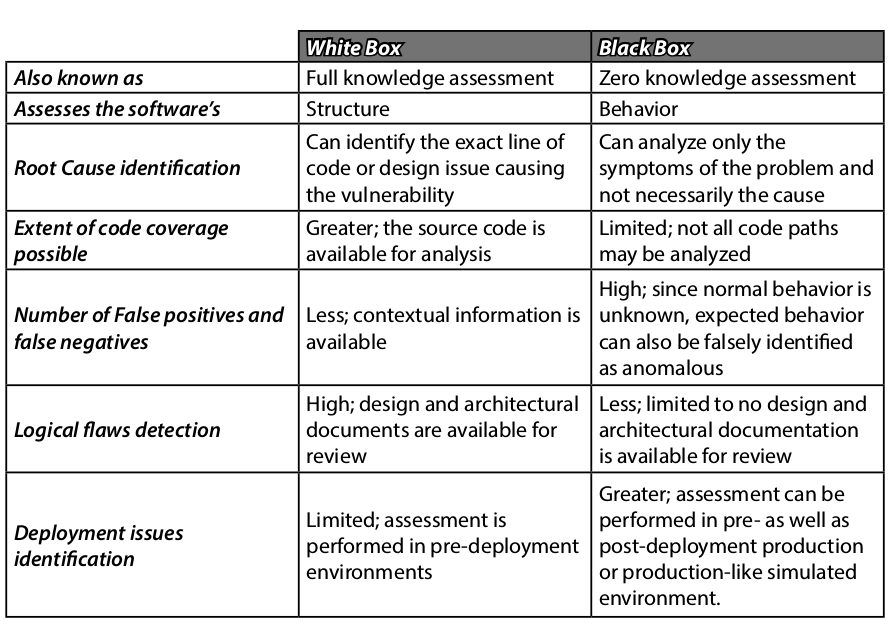
  • white-box testing – testing is performed on a system with the full knowledge of the working components including the source code and its operations.
  • black-box testing – the attacker has no knowledge of the inner workings of the software under test.
black-box versus white-box testing

Type of security testing

  • scanning – automatic enumerations of specific characteristics of an application or network
  • cryptographic validation testing
  • penetration testing – the main objective of penetration testing is
    to see if the network and software assets can be compromised by exploiting the vulnerabilities that were determined by the scans.
  • fuzzing – brute-force method of addressing input validation issues and vulnerabilities.
  • simulation testing – testing the application in an environment that mirrors the associated production environment.


(My) CSSLP Notes – Secure Software Implementation

Note: This notes were strongly inspired by the following books: CSSLP Certification All in one and Official (ISC)2 Guide to the CSSLP CBK, Second Edition

Common Software Vulnerabilities and Controls

Some well-known and useful examples of vulnerability databases and CSSLP-logotracking systems:
  • National Vulnerability Database (NVD) -U.S. government repository of vulnerabilities and vulnerability management data.
  • US Computer Emergency Response Team (CERT) Vulnerability Notes Database – The CERT vulnerability analysis project aims at reducing security risks due to software vulnerabilities in both developed and deployed software.
  • Open Source Vulnerability Database – An independent and open source database that is created by and for the security community.
  • OWASP Top 10 – The OWASP Top 10 List, in addition to considering
    the most common application security issues from a weaknesses or
    vulnerabilities perspective, views application security issues from an
    organizational risks.
  • Common Weakness Enumeration (CWE) – Provides a common language for describing architectural, design or coding software security weaknesses.
  • Common Vulnerabilities and Exposures (CVE) – A dictionary of publicly known information security vulnerabilities and exposures. It is free for use and international in scope.

The most common software security vulnerabilities and risks

  • buffer overflow – is the condition that occurs when data that is being copied into the buffer (contiguous allocated storage space in memory) is more than what the buffer can handle.
    • stack overflow – buffer has been overflowed in the stack space.
      the data flows from one buffer space into another, causing the return address instruction pointer to be overwritten.
    • heap overflow – a heap overflows does not necessarily overflow but corrupts the heap memory space (buffer), overwriting variables and function pointers on the heap.
  • injection flows – occur when the user supplied data is not validated before being processed by an interpreter.
    • SQL injection
    • OS Command injection
    • LDAP injection
    • XML injection – software does not properly filter or quote special characters or reserved words that are used in XML, allowing an attacker to modify the syntax, contents or commands before execution.

  • cross-site scripting – A web application is said to be susceptible to XSS vulnerability when the user supplied input is sent back to the browser client without being properly validated and its content escaped.
    • Non-persistent (Reflected) – the user supplied input script that is injected (also referred to as payload) is not stored but merely included in the response from the web server, either in the results of a search or an error message.
    • Persistent (Stored) – the injected script is permanently stored on the target servers, either in a database, a message forum, a visitor log or an input field. Each time the victims visit the page that has the injected code stored in it or served to it from the web server, the payload script executes in the user’s browse

    • DOM based – the payload is executed in the victim’sbrowser as a result of DOM environment modifications on the client side. The HTTP response (or the web page) itself is not modified, but weaknesses in the client side allows the code contained in the web page client to be modified, so that the payload can be executed.

  • insecure direct object references – an unauthorized user or process can invoke the internal functionality of the software by manipulating parameters and other object values that directly reference this functionality.
  • security misconfiguration -Some of the common examples of security misconfigurations:
    • Missing software and operating system patches.
    • Lack of perimeter and host defensive controls such as firewalls,
      filters.
    • Installation of software with default accounts and settings.
    • Installation of the administrative console with default configuration settings.
  • social engineering
    • Phishing
    • Pharming – scamming practice in which malicious code is installed on a system or server which misdirects users to fraudulent web sites without the user’s knowledge or consent.
    • Vishing – made up of two words, “voice” and “phishing” and is the criminal fraudulent activity in which an attacker steals sensitive information using deceptive social engineering techniques on VoIP networks.
    • SMSishing

Defensive Coding Practices

  • input validation – use blacklist or whitelist technique.
  • canonicalization (C14N) -process of converting data that has more than one possible representation to conform to a standard canonical form.
  • sanitization -process of converting something that is considered dangerous into its innocuous form. Both inputs and outputs can be sanitized.
    • stripping – removing harmful characters from user supplied input.
    • substitution – replacing user supplied input with safer alternatives.
    • literalization – using properties that render the user supplied input to be treated as a literal form.
  • error handling – error messages must be non-verbose and explicitly specified in the software. Redirect errors and exceptions to a custom and default error handling location.
  • cryptographic agility – ability to manage the specifics of the cryptographic functions that are embedded in code without recompiling, typically through a configuration file.
  • tokenization – process of replacing sensitive data with unique
    identification symbols that still retain the needed information about the data, without compromising its security.
  • anti-tampering – techniques assure integrity assurance and protection against unauthorized and malicious alterations of the software code and/or the data.
    • obfuscation.
    • code-signing.

Secure Software Processes

In addition to writing secure code, there are certain processes that must be conducted during the implementation phase that can assure the security of the software:
  • versioning
  • code analysis
    • static
    • dynamic
  • code/peer review

How to intercept and modify Java stacktraces

This ticket was triggered by a “simple” requirement: “Change all the package names in the logs of a Java application (especially the stacktraces) from ‘abc.efg’ (put here whatever you want as name) to ‘hij.klm’ (put here also whatever you want as name) “. The first idea that popped in my mind was to change the packages names at the code level, but this was not feasible because of (rather) big codebase, the use of the (Java) reflexion and the tight timeline.

In the following lines, I will discuss possible solutions to implement this (weird) requirement.


Extend the log4j ThrowableRenderer

If the project is using log4j1x as log library, then a solution would be to create your own throwable renderer by extending the org.apache.log4j.spi.ThrowableRenderer. The (log4j) renderers are used to render instances of java.lang.Throwable (exceptions and errors) into a string representation.

The custom renderer that replaces the packages starting with “org.github.cituadrian” by “xxx.yyy” will look like this:

package org.github.cituadrian.stacktraceinterceptor.log4j;

import org.apache.log4j.DefaultThrowableRenderer;
import org.apache.log4j.spi.ThrowableRenderer;

public class CustomThrowableRenderer implements ThrowableRenderer {
    private final DefaultThrowableRenderer defaultRenderer =  
                   new DefaultThrowableRenderer(); 
    
    @Override 
    public String[] doRender(Throwable t) {
      String[] initialResult = defaultRenderer.doRender(t); 
      for (int i = 0; i < initialResult.length; i++) { 
        String line = initialResult[i]; 
        if (line.contains("org.github.cituadrian")) { 
           initialResult[i] = line.replaceAll("org.github.cituadrian", "xxx.yyy"); 
        } 
       } 
      return initialResult; 
    }
}

Basically, the custom renderer is delegating the task of creating a String from a Throwable to a DefaultThrowableRenderer and then it checks and replace the desired package names.

In order to be used, the renderer should be defined in the log4j.xml file:

<?xml version="1.0" encoding="UTF-8" ?>
<!DOCTYPE log4j:configuration SYSTEM "log4j.dtd">
<log4j:configuration debug="true"
    xmlns:log4j='http://jakarta.apache.org/log4j/'>
 
  <throwableRenderer class= 
     "org.github.cituadrian.stacktraceinterceptor.log4j.CustomThrowableRenderer"/>
...

Use a log4j2 pattern layout

If your project is using log4j2 as logging library, then you can use a (log4j2) layout pattern.  The layout pattern will look like:

<?xml version="1.0" encoding="UTF-8"?>
<Configuration>
 <Appenders>
 <Console name="STDOUT" target="SYSTEM_OUT">
 <PatternLayout pattern=
  "%replace{%class %log %msg %ex}{org\.github\.cituadrian}{xxx\.yyy}"/>
 </Console>
...


Modify (a.k.a. Weaving) the java.lang.StackTraceElement class with AOP

Before even explaining what it really means, I have to warn you that weaving JDK classes is rarely necessary (and usually a bad idea) even if it’s possible using an AOP framework like AspectJ.

For this case I used the AspectJ as AOP framwork because the weaver (aop compiler) is able to do binary weaving, meaning the weaver takes classes and aspects in .class form and weaves them together to produce binary-compatible .class files that run in any Java VM. The command line to obtain a weaved jar is the following one:

ajc -inpath rt.jar Aspect.java -outjar weavedrt.jar

In the case of weaving JDK classes one extra step is necessary in order to make the application work; we must create a new version of the rt.jar file  or create just a small JAR file with the JDK woven classes which then must be appended to the boot-classpath of the JDK/JRE when firing up the target application. The command line to execute the target application is the following one:

java -Xbootclasspath/<path to weavedrt.jar>;<path to aspectjrt.jar> TargetApplication

If you don’t want to worry about all the technical details of weaving and executing the application and you are using Maven then you can use the (marvelous) SO_AJ_MavenWeaveJDK project from gitHub (that handles everything using Maven)

The aspect that will modify the stacktrace packages looks like:

package org.github.cituadrian.stacktraceinterceptor.app;

import org.aspectj.lang.ProceedingJoinPoint;
import org.aspectj.lang.annotation.Around;
import org.aspectj.lang.annotation.Aspect;
import org.aspectj.lang.annotation.Pointcut;
@Aspectpublic class StackTraceInterceptorAspect {
    @Pointcut("execution(String java.lang.StackTraceElement.getClassName()) "
            + "&& !within(StackTraceInterceptorAspect)")     
    public void executeStackTraceElementGetClassNamePointcut() {}        
    
    @Around("executeStackTraceElementGetClassNamePointcut()")    
    public Object executeStackTraceElementGetClassNameAdvice(    
                   final ProceedingJoinPoint pjp) throws Throwable {        
        Object initialResponse =  pjp.proceed();         
        if (initialResponse instanceof String 
               && ((String)initialResponse).startsWith("org.github.cituadrian")) {     
                 return ((String)initialResponse).replaceFirst("org.github.cituadrian", "xxx.zzz"); 
        }        
        return initialResponse;    
    }
 }

In a nutshell, the StackTraceInterceptorAspect will intercept all the calls to the java.lang.StackTraceElement#getClassName method and it will change the returned result of the method if the class name contains the string “org.github.cituadrian”.

If you are interested to learn more about AspectJ I really recommend you to buy a copy of the AspectJ in action (second edition) book.


Modify and shadow the java.lang.StackTraceElement class

 Using AOP just to intercept and modify a single method of a single class is a little bit over-killing. In this case there is another solution; the solution would be create a custom version of the java.lang.StackTraceElement class and add this custom class in the boot-classpath of the JDK/JRE when firing up the target application, so the initial version will be shadowed by the custom version.

An implementation of StacktraceElement class can be found here. So you can modify by hand the java.lang.StackTraceElement#getClassName method or the java.lang.StackTraceElement#toString method.

 To execute the target application, you must create a jar with the modified class and add it into the boot-classpath (something similar to the AspectJ solution):

java -Xbootclasspath/<path to custom class.jar> TargetApplication