These are my notes of OWASP Belgium Chapter meeting of 17th of September.
Docker Threat Modeling and Top 10 (by Dirk Wetter)
Docker not really new:
- FreeBSD – Jails year 2000
- Solaris : Zones/Container year 2004
Threat Vectors on the (Docker) containers:
- Application escape
- Orchestration tool
- Open management interfaces
- ex: CoreOS: tcp/2379, K8N insecure dashboard @tcp 9090
- For more info about the vulnerabilities of orchestration tools please see “Research: Exposed orchestration tools”
- Open management interfaces
- Other containers
- Platform host; especially after the discovery of vulnerabilities into microprocessors (Spectre, Foreshadow).
- Network: not properly secured network.
- Integrity and confidentiality of OS images.
Top 10 Docker security
- Docker insecure default running code as privileged user
- workaround : remap user namespaces user_namespaces (7)
- Patch management
- Host
- Container Orchestration
- OS Images
- Network separation and firewalling
- use basic DMZ techniques
- allow only what is needed on the firewall level
- (for external network connection) do not allow initiating outgoing TCP connections.
- Maintain security contexts
- do not mix Development/Production images
- do not mix Front-End and Back-End services
- do not run arbitrary images.
- Secrets management
- where to store keys, certificates, credentials
- not easy to solved problem
- Resource protection
- limit memory (
--memory=), swap (memory-swap=), cpu usage (--cpu-*),--pids-limit xx - do not mount external disks if not necessary, if really necessary then mount it as r/o.
- limit memory (
- Image integrity and origin
- can use the Docker content trust (Docker Notary)
- Follow the immutable paradigm
- run the container in read only mode:
docker run --read-only...ordocker run –v /hostdir:/containerdir:ro
- run the container in read only mode:
- Hardening
- Container
docker run --cap-dropoption, you can lock down root in a container so that it has limited access within the container.--security-opt=no-new-privilegesprevents the uid transition while running asetuidbinary meaning that even if the image has dangerous code in it, we can still prevent the user from escalating privileges
- Host
- networking – only SSH and NTP
- Container
- Logging
Securing Containers on the High Seas (by Jack Mannino)
The entire presentation is around the 4 phases used to create an application that runs on containers:
- Design
- Build
- Ship
- Run
Design (secure the design)
- Understand how the system will be used and abused.
- Beware of tightly-coupled components.
- Can solve security issues through patterns that lift security out of the container itself. ex Service Mesh Pattern.
Build (secure the build process)
- Build first level of security controls into containers.
- Orchestration systems can override these controls and mutate containers through an extra layer of abstraction.
- Use base images that ship with minimal installed packages and
dependencies. - Use version tags vs. image:latest; do not use latest !
- Use images that support security kernel features
- Limit privileges
- Often, we only need a subset of capabilities
- ex: Ping command requires CAP_NET_RAW. So we can run docker image like this:
- ex: Ping command requires CAP_NET_RAW. So we can run docker image like this:
- Often, we only need a subset of capabilities
docker run -d --cap-drop=all --cap-add=net_raw my-image
- Kernel Hardening
- Seccomp is a Linux kernel feature that allows you to filter dangerous syscalls.
- MAC (Mandatory Access Control)
- SELinux and AppArmor allow you to set granular controls on files and network access.
- Docker leads the way with its default AppArmor profile.
Ship
- Validate the integrity of the container.
- ex: Docker Content Trust & Notary
- Consume only trusted content for tagged Docker builds.
- Validate security pre-conditions.
- Allow or deny a container’s cluster admission.
- Centralized interfaces and validation.
Run
- Containers are managed through orchestration systems.
- Management API – used to deploy, modify and kill services.
- Frequently deployed without authentication or access control.
- Authentication
- Authenticate subjects (users and service accounts) to the cluster.
- Avoid sharing service accounts across multiple services.
- Subjects should only have access to the resources they need.
- Secrets management
- Safely inject secrets into containers at runtime.
- Anti-patterns:
• Hardcoded.
• Environment variables.
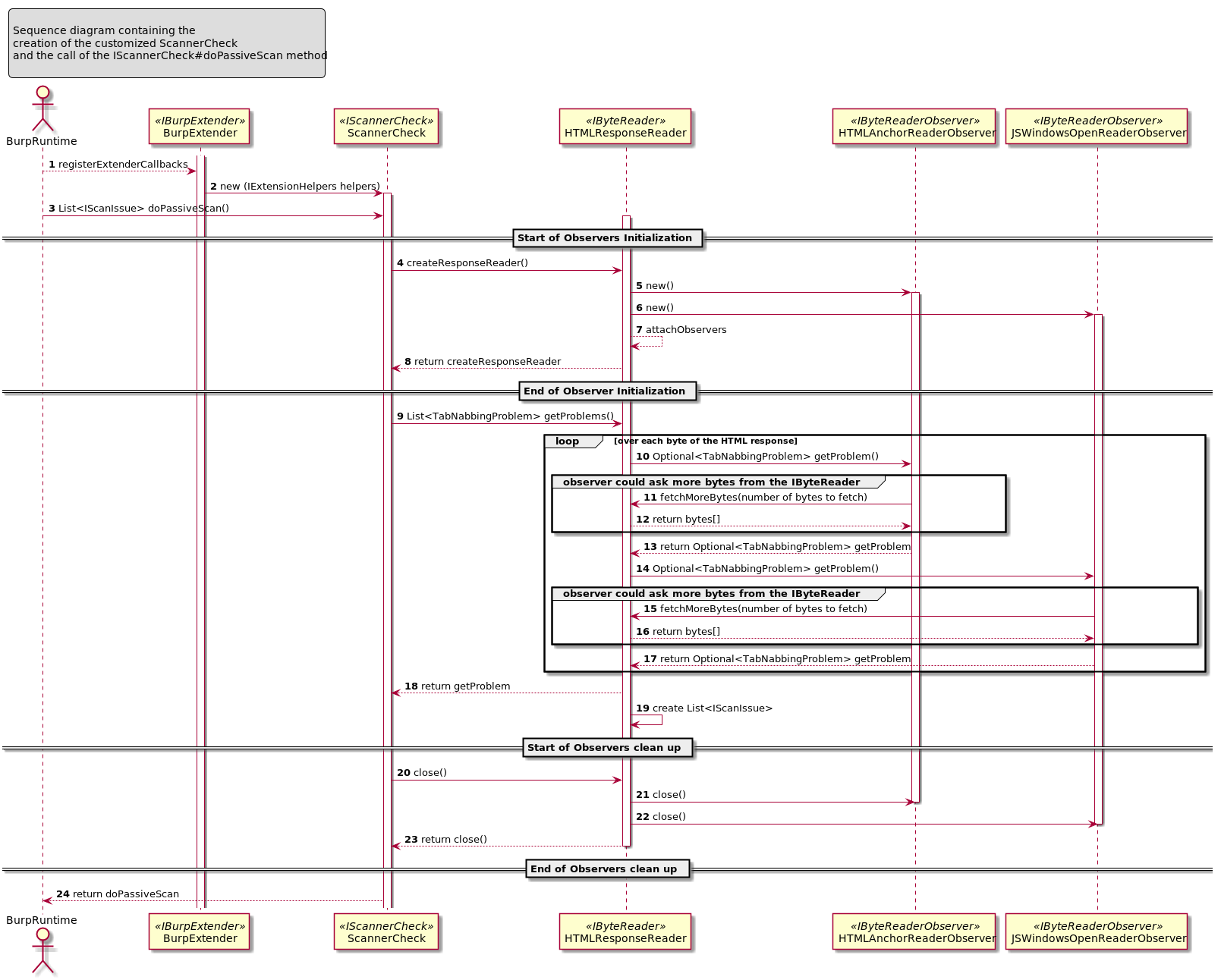
 The goal of this ticket is to explain how to create an extension for the Burp Suite Professional taking as implementation example the “Reverse Tabnabbing” attack.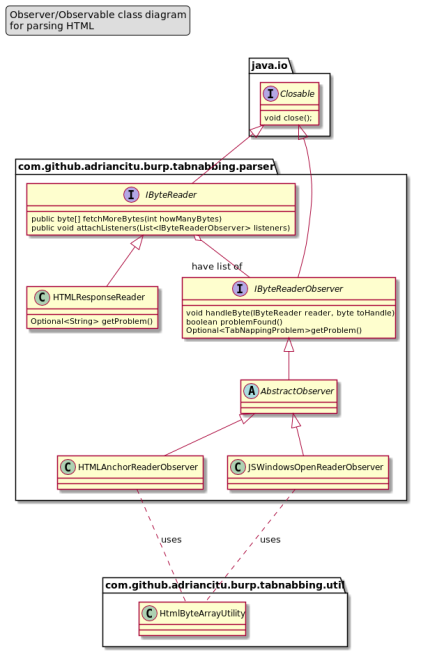


 Adventures in the programming jungle
You must be logged in to post a comment.